
محافظ Web3 وكيف تتفاعل مع التطبيقات | Web3 Wallets and How They Interact with dApps
تعلّم ببساطة، خطوة بخطوة
Learn simply, step by step
معلومة واضحة، ثم خطوة جديدة.
Clear knowledge, one step at a time.
محافظ Web3 وكيف تتفاعل مع التطبيقات Web3 Wallets and How They Interact with dApps
تُعد محافظ Web3 بوابة المستخدم للتفاعل مع التطبيقات اللامركزية. فهي لا تُستخدم فقط لإدارة الأصول الرقمية، بل تساعد أيضًا في الاتصال بـ dApps وتوقيع المعاملات والموافقة على بعض الصلاحيات.
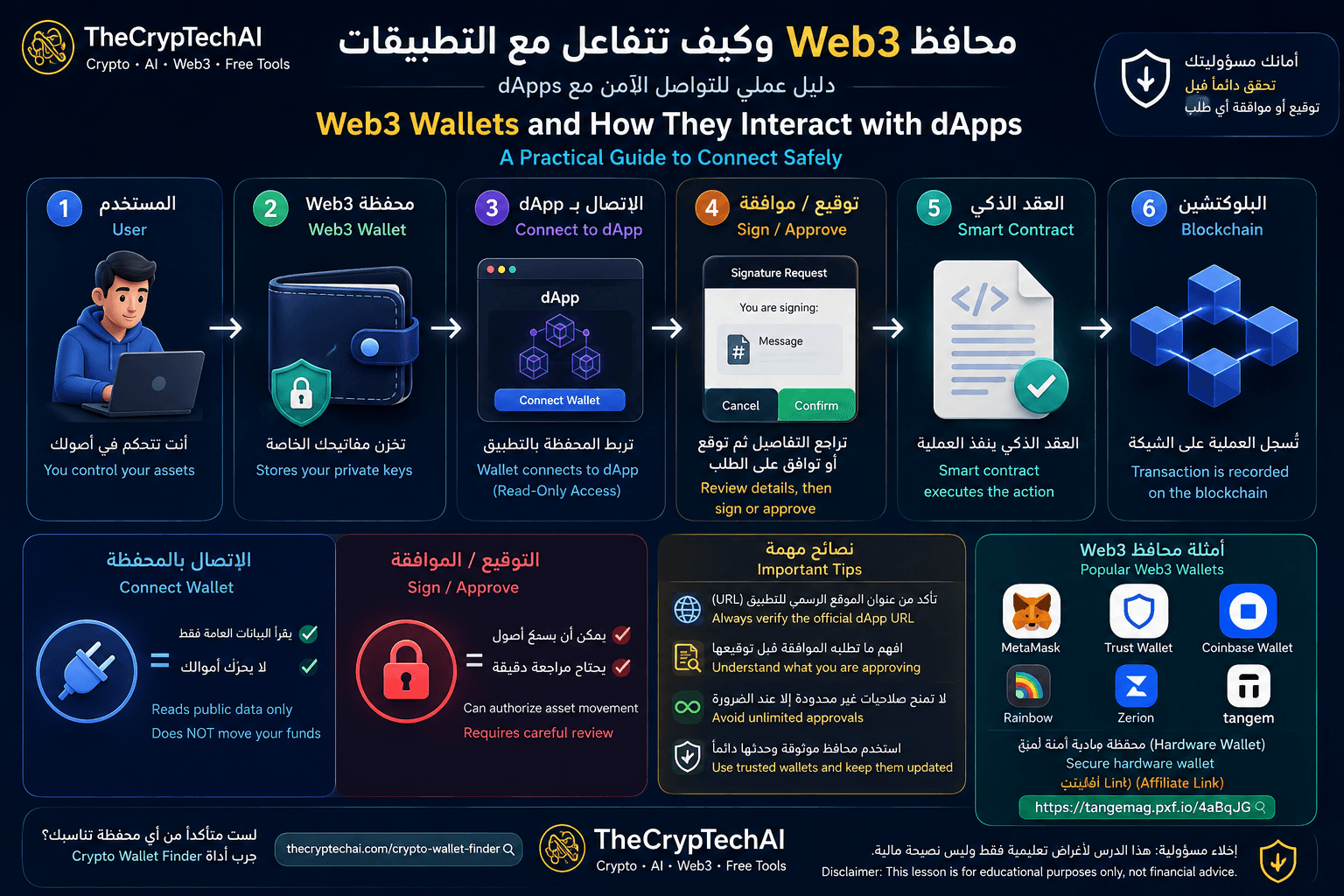
ما هي محافظ Web3؟
هي محافظ تساعدك على إدارة مفاتيح الوصول إلى أصولك والتفاعل مع شبكات البلوكتشين والتطبيقات المبنية عليها.
بدل إنشاء حساب تقليدي باسم مستخدم وكلمة مرور داخل كل تطبيق، تستطيع العديد من dApps التعرف على عنوان محفظتك بعد أن تسمح لها بالاتصال.
كيف تتصل المحفظة بتطبيق dApp؟
عند زيارة تطبيق يدعم Web3 ستجد غالبًا خيارًا مثل Connect Wallet. بعد اختياره، تظهر نافذة من المحفظة تطلب منك تحديد الحساب أو الشبكة التي تريد السماح للتطبيق بالاتصال بها.
بعد الاتصال يستطيع التطبيق استخدام عنوان الحساب المسموح به وعرض البيانات العامة المرتبطة به واقتراح معاملات تحتاجها الخدمة.
لكن تنفيذ معاملة مقترحة يحتاج عادةً إلى موافقتك من داخل المحفظة.
Connect Wallet لا يعني إرسال أموالك
من المهم التفرقة بين الاتصال بالمحفظة وبين الموافقة على معاملة أو صلاحية.
مجرد الاتصال بتطبيق لا يمنحه تلقائيًا الحق في نقل أصولك. لكن التطبيق يمكنه بعد الاتصال أن يطلب منك توقيع رسائل أو تأكيد معاملات أو منح صلاحيات معينة.
لهذا السبب لا تضغط على Sign أو Approve تلقائيًا لمجرد أنك تثق في شكل الموقع.
ما هو Token Approval؟
عند استخدام DEX أو بعض بروتوكولات DeFi، قد تحتاج إلى منح عقد ذكي صلاحية للتعامل مع نوع معين من التوكنات الموجودة في محفظتك.
هذه العملية تُعرف باسم Token Approval. ويمكن أن تحدد الصلاحية كمية معينة من التوكن، بينما قد تطلب بعض التطبيقات حدًا مرتفعًا أو غير محدود.
راجع دائمًا الأصل والكمية والعقد الذي يحصل على الصلاحية قبل الموافقة.
ماذا يحدث بعد الموافقة؟
إذا كانت العملية تحتاج إلى تنفيذ معاملة على البلوكتشين، تمر بصورة مبسطة بالمراحل التالية:
1. تختار العملية داخل dApp.
2. ترسل واجهة التطبيق الطلب إلى المحفظة.
3. تراجع تفاصيل الطلب وتوافق أو ترفض.
4. يتم إرسال المعاملة الموقعة إلى الشبكة.
5. ينفذ العقد الذكي العملية وفق قواعده.
6. تُسجل النتيجة الناتجة على البلوكتشين.
كيف تحمي محفظتك عند استخدام dApps؟
اتبع بعض القواعد الأساسية قبل التفاعل:
• تأكد من عنوان الموقع الرسمي قبل ربط المحفظة.
• اقرأ تفاصيل التوقيع أو المعاملة قبل الموافقة.
• راجع صلاحيات التوكنات ولا تمنح صلاحية أكبر مما تحتاج دون سبب واضح.
• لا تشارك العبارة السرية أو المفاتيح الخاصة مع أي موقع.
• تجنب الروابط التي تصل إليك من مصادر مجهولة.
• راجع الصلاحيات القديمة وألغِ ما لم تعد تحتاج إليه.
كيف تختار محفظة مناسبة؟
لا توجد محفظة واحدة مثالية للجميع. الاختيار يعتمد على الشبكات التي تستخدمها، وطريقة تخزين الأصول، ومدى احتياجك للتفاعل اليومي مع تطبيقات Web3.
يمكنك استخدام
Crypto Wallet Finder من TheCrypTechAI
لمساعدتك في استكشاف نوع المحفظة الأنسب لاستخدامك.
ماذا عن المحافظ المادية؟
إذا كنت تريد الاحتفاظ بالمفاتيح الخاصة في جهاز مادي بدل الاعتماد فقط على محفظة برمجية، فهناك محافظ Hardware Wallet مخصصة لهذا الغرض.
من الخيارات التي يمكنك البحث عنها Tangem. اقرأ خصائصها وطريقة عملها وقارنها بالبدائل قبل اتخاذ قرار الشراء.
زيارة Tangem عبر رابط TheCrypTechAI
إفصاح: الرابط السابق Affiliate، وقد يحصل TheCrypTechAI على عمولة إذا تم الشراء من خلاله دون تكلفة إضافية عليك.
مصدر إضافي عن الاتصال والصلاحيات
يمكنك مراجعة
أدلة MetaMask الرسمية للتعامل مع dApps
لمعرفة المزيد عن الاتصال بالتطبيقات وإدارة الصلاحيات.
الخلاصة
تجعل محافظ Web3 من الممكن التفاعل مباشرة مع التطبيقات والعقود الذكية، لكن التحكم المباشر يعني أيضًا أن المستخدم مسؤول عن مراجعة ما يوقع عليه وما يمنحه من صلاحيات.
تذكر دائمًا أن Connect Wallet ليس هو نفسه Sign أو Approve. اقرأ كل طلب قبل تأكيده، خصوصًا عندما يتعلق الأمر بصلاحية الوصول إلى أصولك.
في الدرس التالي سنتعرف على منصات التداول اللامركزية DEX وكيف تعمل.
Web3 Wallets are an important gateway for interacting with decentralized applications. They are not only used to manage digital assets but also allow users to connect to dApps, sign transactions, and approve certain permissions.
What Are Web3 Wallets?
These wallets help users manage the keys that provide access to their digital assets while interacting with blockchain networks and applications built on them.
Instead of creating a traditional username and password for every service, many dApps can recognize your public wallet address after you allow the application to connect.
How Does a Wallet Connect to a dApp?
When visiting a Web3 application, you will often see an option such as Connect Wallet. Selecting it opens a request from your wallet asking which account or network you want to connect.
Once connected, the application can use the permitted account address, display relevant public blockchain data, and propose transactions required by the service.
A proposed blockchain transaction will generally still require confirmation from your wallet before it can be submitted.
Connect Wallet Does Not Mean Sending Your Funds
It is important to understand the difference between connecting a wallet and approving a transaction or permission.
Connecting alone does not automatically give a dApp permission to move your assets. However, after connecting, an application may ask you to sign messages, confirm transactions, or grant specific permissions.
Never press Sign or Approve automatically just because a website looks legitimate.
What Is a Token Approval?
When using a decentralized exchange or certain DeFi protocols, you may need to give a smart contract permission to interact with a particular token in your wallet.
This is known as a Token Approval. An approval may specify a particular amount, while some applications may request a much larger or unlimited allowance.
Always review the asset, amount, and smart contract receiving the permission before approving the request.
What Happens After You Approve?
When an action requires an on-chain transaction, the process can be simplified as follows:
1. You select an action inside the dApp.
2. The application sends a request to your wallet.
3. You review the details and approve or reject the request.
4. The signed transaction is submitted to the network.
5. The smart contract executes the operation according to its rules.
6. The resulting changes are recorded on the blockchain.
How Can You Stay Safer When Using dApps?
Follow several basic precautions before interacting with an application:
• Verify the official website address before connecting your wallet.
• Read signature and transaction details before confirming them.
• Review token permissions and avoid unnecessary unlimited approvals.
• Never share your recovery phrase or private keys with a website.
• Avoid links received from unknown or suspicious sources.
• Review old permissions and revoke those you no longer need.
How Do You Choose the Right Wallet?
There is no single wallet that is ideal for everyone. Your choice depends on the blockchain networks you use, how you store your assets, and how frequently you interact with Web3 applications.
You can use the
TheCrypTechAI Crypto Wallet Finder
to explore wallet options based on your needs.
What About Hardware Wallets?
If you prefer to keep your private keys protected by a physical device rather than relying only on a software wallet, a hardware wallet may be worth researching.
One option you can compare with other wallets is Tangem. Review its features, security model, supported networks, and limitations before making a purchase decision.
Visit Tangem through TheCrypTechAI
Disclosure: The link above is an affiliate link. TheCrypTechAI may receive a commission if you make a purchase through it, at no additional cost to you.
Learn More About dApp Connections and Permissions
You can also read the
official MetaMask guides for interacting with dApps
to learn more about wallet connections and permissions.
Key Takeaway
Web3 Wallets make it possible to interact directly with decentralized applications and smart contracts, but direct control also means users are responsible for reviewing what they sign and which permissions they grant.
Always remember that Connect Wallet is not the same as Sign or Approve. Carefully review every request, especially when it involves permission to access your digital assets.
In the next lesson, we will explore decentralized exchanges (DEXs) and how they work.
اختبر فهمك
Check Your Understanding
سؤالان سريعان لتثبيت أهم ما تعلمته.
Two quick questions to reinforce the key ideas.