
بناء مشروع ذكاء اصطناعي متكامل خطوة بخطوة | Build a Complete AI Automation Project
تعلّم ببساطة، خطوة بخطوة
Learn simply, step by step
معلومة واضحة، ثم خطوة جديدة.
Clear knowledge, one step at a time.
بناء مشروع ذكاء اصطناعي متكامل خطوة بخطوة Build a Complete AI Automation Project
بناء مشروع ذكاء اصطناعي متكامل
بعد أن تعلّمنا نماذج اللغة الكبيرة LLMs وAPIs وStructured Outputs وRAG وAI Agents والأتمتة، حان الوقت لجمع هذه المفاهيم في مشروع ذكاء اصطناعي متكامل يوضح كيف تعمل هذه التقنيات معًا داخل نظام واحد.
سنستخدم مثالًا عمليًا لبناء مساعد دعم ذكي يستقبل رسالة من المستخدم، ويحللها، ويحدد نوعها وأولويتها، ويبحث في قاعدة المعرفة عند الحاجة، ثم يختار الإجراء المناسب ويعيد الرد النهائي.
يساعدك هذا المشروع الذكاء الاصطناعي المتكامل على فهم العلاقة بين تحليل البيانات واتخاذ القرار واستخدام الأدوات وتنفيذ الإجراءات داخل Workflow واحد.
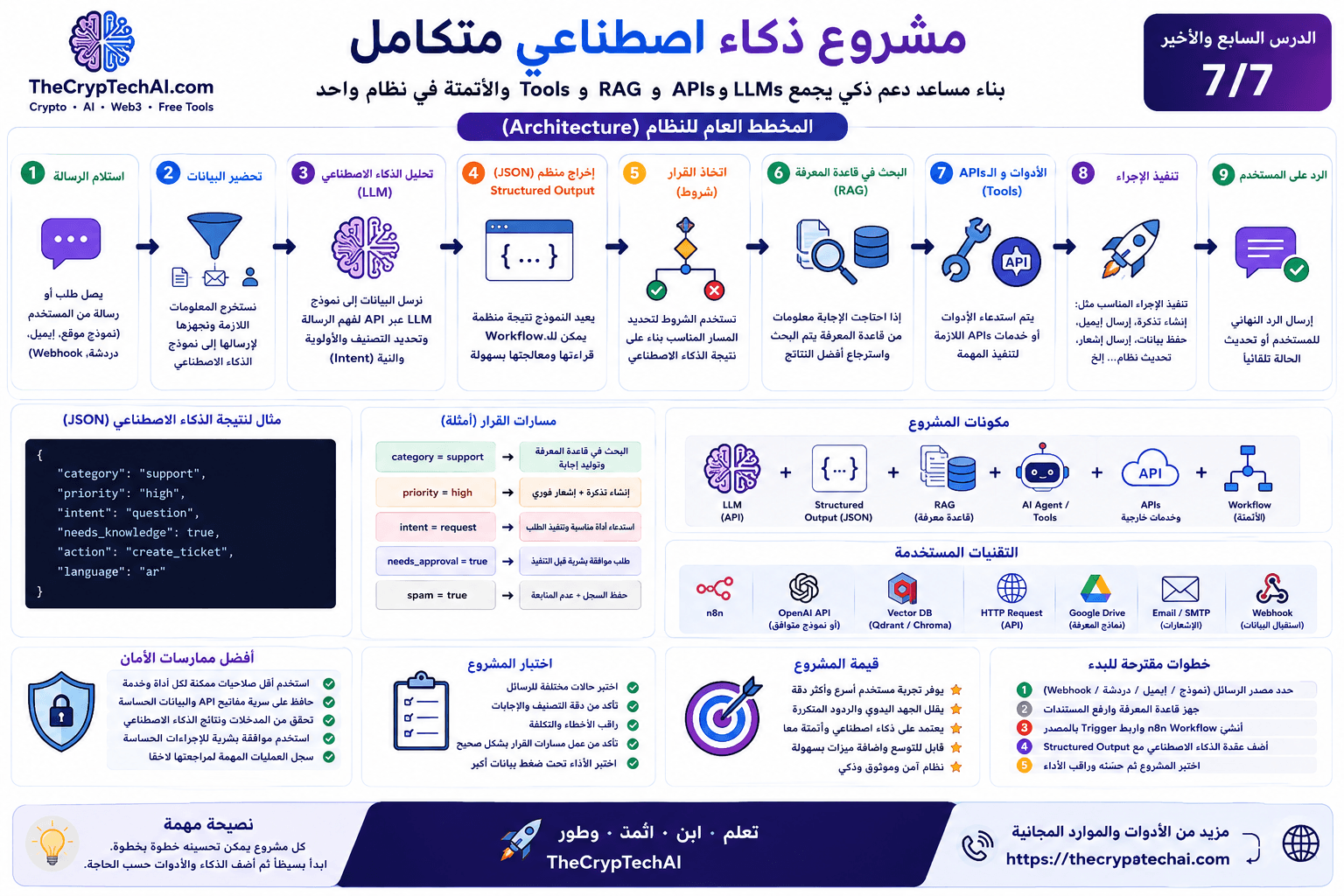
فكرة مشروع الذكاء الاصطناعي المتكامل
الهدف هو إنشاء نظام يستطيع التعامل مع رسالة واردة وتحويلها إلى سلسلة من الخطوات المنظمة:
User Message → Workflow → LLM → Structured Output → Decision → RAG / Tools → Action → Final Response
بدل أن يقوم نموذج AI بكل شيء بمفرده، نقسم النظام إلى مكونات واضحة، ويكون لكل مكون وظيفة محددة.
1. استقبال رسالة المستخدم
تبدأ العملية عندما تصل رسالة أو طلب جديد إلى النظام.
يمكن أن تأتي الرسالة من:
- نموذج Contact Form على موقع.
- Webhook.
- بريد إلكتروني.
- Chatbot.
- تطبيق أو خدمة خارجية عبر API.
وصول الرسالة يمثل الـTrigger الذي يبدأ الـWorkflow.
2. تجهيز البيانات
قبل إرسال المعلومات إلى نموذج الذكاء الاصطناعي، نقوم باستخراج البيانات الضرورية وتنظيفها وتجهيزها.
على سبيل المثال، قد نحتاج إلى:
- نص الرسالة.
- اسم المستخدم.
- البريد الإلكتروني.
- لغة الرسالة.
- رقم الطلب إن وجد.
من الأفضل إرسال البيانات المطلوبة للمهمة فقط، بدل تمرير معلومات كثيرة لا يحتاج إليها النموذج.
3. تحليل الرسالة باستخدام LLM
بعد تجهيز البيانات، يرسل الـWorkflow الرسالة إلى نموذج LLM من خلال API.
يمكن أن تكون مهمة النموذج هي فهم الرسالة واستخراج معلومات مثل:
- نوع الطلب.
- درجة الأولوية.
- Intent المستخدم.
- لغة الرسالة.
- هل يحتاج السؤال إلى البحث في قاعدة المعرفة؟
- ما الإجراء المقترح؟
هنا نستخدم نموذج اللغة للفهم والتحليل، وليس لتنفيذ جميع الإجراءات بنفسه.
4. تحويل النتيجة إلى Structured Output
حتى يستطيع الـWorkflow التعامل مع نتيجة AI بسهولة، نطلب من النموذج إرجاع بيانات منظمة بدل فقرة نصية طويلة.
يمكن أن تكون النتيجة مثل:
{
  "category": "support",
  "priority": "high",
  "intent": "question",
  "needs_knowledge": true,
  "action": "create_ticket",
  "language": "ar"
}
بهذا الشكل يستطيع النظام قراءة كل قيمة واستخدامها في خطوات القرار التالية.
5. اتخاذ القرار داخل الـWorkflow
بعد استقبال JSON، تبدأ مرحلة اتخاذ القرار باستخدام شروط مثل IF أو Switch.
على سبيل المثال:
- category = support → الانتقال إلى مسار الدعم.
- priority = high → إنشاء تذكرة وإرسال إشعار سريع.
- needs_knowledge = true → البحث في قاعدة المعرفة.
- action = create_ticket → استدعاء أداة إنشاء التذاكر.
- spam = true → إيقاف المعالجة أو تسجيل الرسالة فقط.
وهنا نرى كيف يعمل AI مع قواعد الأتمتة بدل أن يحل محلها بالكامل.
6. استخدام RAG للبحث في المعرفة
إذا احتاج المستخدم إلى إجابة تعتمد على معلومات خاصة بالموقع أو الشركة، يمكن للنظام استخدام RAG.
على سبيل المثال:
User Question → Search Knowledge Base → Retrieve Relevant Information → LLM → Answer
تقوم مرحلة Retrieval بالبحث عن المعلومات الأكثر ارتباطًا بالسؤال، ثم يتم إرسالها إلى نموذج اللغة كسياق إضافي.
بهذا لا نحتاج إلى تدريب نموذج جديد في كل مرة تتغير فيها قاعدة المعرفة.
7. استخدام AI Agent والأدوات
في بعض الحالات قد يحتاج مشروع ذكاء اصطناعي متكامل إلى اختيار أداة مختلفة حسب نوع المهمة.
هنا يمكن استخدام AI Agent مع مجموعة أدوات محددة، مثل:
- البحث في قاعدة بيانات.
- استدعاء API.
- إنشاء Ticket.
- قراءة ملف.
- البحث في قاعدة المعرفة.
- إرسال إشعار.
يستطيع Agent تحديد الأداة المناسبة، لكن التطبيق أو نظام الأتمتة هو الذي ينفذ الأداة الفعلية وفق الصلاحيات والقواعد المحددة.
8. تنفيذ الإجراء
بعد تحديد الإجراء المناسب، يقوم الـWorkflow بتنفيذه.
قد يكون الإجراء:
- إنشاء تذكرة دعم.
- إرسال بريد إلكتروني.
- حفظ بيانات في قاعدة بيانات.
- إرسال Notification إلى الفريق.
- تحديث حالة طلب.
- إنشاء مهمة للمتابعة.
من الأفضل أن تبقى الإجراءات الحساسة تحت قواعد واضحة، وألا يستطيع نموذج AI تنفيذها دون قيود.
9. إنشاء الرد النهائي
بعد اكتمال الخطوات المطلوبة، يمكن للنظام تجهيز الرد النهائي للمستخدم.
إذا تم استخدام RAG، يمكن للنموذج الاعتماد على المعلومات التي تم استرجاعها. وإذا تم تنفيذ إجراء مثل إنشاء Ticket، يمكن تضمين نتيجة الإجراء في الرد.
مثال:
تم إنشاء طلب الدعم بنجاح، وسيتم إرساله إلى الفريق المختص.
أين تدخل APIs في المشروع؟
تعمل APIs كجسور بين مكونات النظام المختلفة.
قد يستخدم المشروع API من أجل:
- إرسال Prompt إلى نموذج AI.
- قراءة معلومات من خدمة خارجية.
- إنشاء Ticket.
- إرسال رسالة.
- تحديث بيانات في تطبيق آخر.
لذلك تعتبر APIs جزءًا مهمًا من ربط الذكاء الاصطناعي بالأنظمة الحقيقية.
كيف تتجمع مكونات المشروع؟
يمكن تلخيص بنية المشروع في:
LLM + Structured Output + RAG + AI Agent/Tools + APIs + Workflow Automation
لكل جزء وظيفة مختلفة:
- LLM: فهم وتحليل اللغة.
- Structured Output: تحويل النتيجة إلى بيانات منظمة.
- RAG: استرجاع معلومات من قاعدة المعرفة.
- AI Agent: اختيار الأدوات أو الخطوات المناسبة عند الحاجة.
- APIs: التواصل مع النماذج والخدمات الخارجية.
- Workflow: تنظيم الخطوات والقواعد وتنفيذ العملية.
هل نحتاج كل هذه المكونات دائمًا؟
لا. المشروع الجيد لا يستخدم تقنية لمجرد أنها متاحة.
إذا كان المطلوب مجرد تصنيف رسالة، فقد يكون:
Trigger → LLM → JSON → Condition → Action
كافيًا تمامًا.
نضيف RAG عندما نحتاج إلى معرفة خارجية، ونضيف Agent عندما نحتاج إلى اختيار ديناميكي بين أدوات أو خطوات متعددة.
عند تطوير مشروع ذكاء اصطناعي متكامل للاستخدام الحقيقي، يجب تحديد مسؤولية كل مكون بوضوح واختبار انتقال البيانات بين مراحل النظام المختلفة.
الأمان والصلاحيات
عند بناء مشروع ذكاء اصطناعي متكامل متصل بخدمات حقيقية، يصبح الأمان جزءًا أساسيًا من التصميم.
- استخدم أقل قدر ممكن من الصلاحيات لكل أداة.
- لا تضع API Keys داخل Prompts أو محتوى ظاهر للمستخدم.
- تحقق من البيانات قبل تنفيذ الإجراءات.
- ضع حدودًا واضحة لما يستطيع Agent فعله.
- استخدم Human Approval قبل الإجراءات الحساسة عند الحاجة.
- سجل العمليات المهمة لمراجعتها لاحقًا.
يمكنك مراجعة
Security Center في TheCrypTechAI
للتعرف على المزيد من أساسيات الحماية والأمان الرقمي.
Human Approval للإجراءات الحساسة
ليس من الضروري أن تكون كل خطوات المشروع مستقلة بالكامل.
يمكن إضافة مرحلة موافقة بشرية قبل إجراءات مثل:
- حذف البيانات.
- إرسال رسالة مهمة باسم المستخدم.
- تنفيذ معاملات مالية.
- تغيير بيانات حساسة.
- منح صلاحيات جديدة.
وهذا يسمح بالاستفادة من AI مع الاحتفاظ بالتحكم البشري عندما تكون المخاطر أعلى.
اختبار المشروع قبل تشغيله
لا يكفي اختبار المشروع برسالة واحدة فقط.
يجب تجربة حالات مختلفة مثل:
- رسالة دعم عادية.
- رسالة عالية الأولوية.
- رسالة غير واضحة.
- رسالة بلغة مختلفة.
- رسالة Spam.
- حالة فشل API.
- عدم العثور على معلومات في قاعدة المعرفة.
اختبار الحالات المختلفة يساعد على اكتشاف الأخطاء قبل استخدام النظام فعليًا.
مراقبة التكلفة والأداء
بعد تشغيل المشروع، من المهم متابعة الأداء والتكلفة.
راقب أشياء مثل:
- عدد طلبات AI.
- استخدام Tokens.
- وقت تنفيذ الـWorkflow.
- نسبة الأخطاء.
- دقة التصنيف.
- عدد الحالات التي تحتاج إلى تدخل بشري.
هذه البيانات تساعد على تحسين المشروع تدريجيًا بدل الاعتماد على التخمين.
ابدأ بسيطًا ثم طوّر المشروع
لا تحتاج إلى بناء النظام الكامل من اليوم الأول.
يمكن البدء بنسخة بسيطة:
Message → AI Classification → JSON → Action
ثم إضافة المكونات تدريجيًا:
RAG → Tools → Agent → Human Approval → Monitoring
هذه الطريقة تجعل المشروع أسهل في الاختبار والصيانة والتطوير.
مصدر خارجي للتعلم
للتعمق في بناء أنظمة AI داخل Workflows، يمكنك مراجعة
وثائق n8n الرسمية الخاصة بـAdvanced AI
والتعرف على طرق دمج نماذج الذكاء الاصطناعي والأدوات داخل أنظمة الأتمتة.
يمكن البدء بنسخة بسيطة من مشروع ذكاء اصطناعي متكامل ثم إضافة RAG والأدوات وAI Agents والمراقبة تدريجيًا حسب احتياجات المشروع.
الخلاصة
يوضح هذا المشروع الذكاء الاصطناعي المتكامل أن بناء نظام AI عملي لا يعتمد على نموذج اللغة وحده، بل على مجموعة من المكونات التي تعمل معًا.
يمكن لـLLM فهم البيانات، وStructured Outputs تنظيم النتائج، وRAG توفير المعرفة، وAI Agents اختيار الأدوات عند الحاجة، بينما تتولى APIs وWorkflows ربط المكونات وتنفيذ الإجراءات.
بهذا نكون قد انتقلنا خلال هذا المسار من فهم نماذج LLM إلى بناء تصور كامل لنظام يجمع AI + Data + Tools + Automation داخل مشروع واحد قابل للتطوير.
Build a Complete AI Automation Project
After learning about LLMs, APIs, Structured Outputs, RAG, AI Agents, and automation, it is time to combine these concepts into a complete AI Automation Project that demonstrates how they can work together inside one practical system.
In this final project, we will use the example of an intelligent support assistant that receives a user message, analyzes it, determines its category and priority, searches a knowledge base when necessary, selects an appropriate action, and produces a final response.
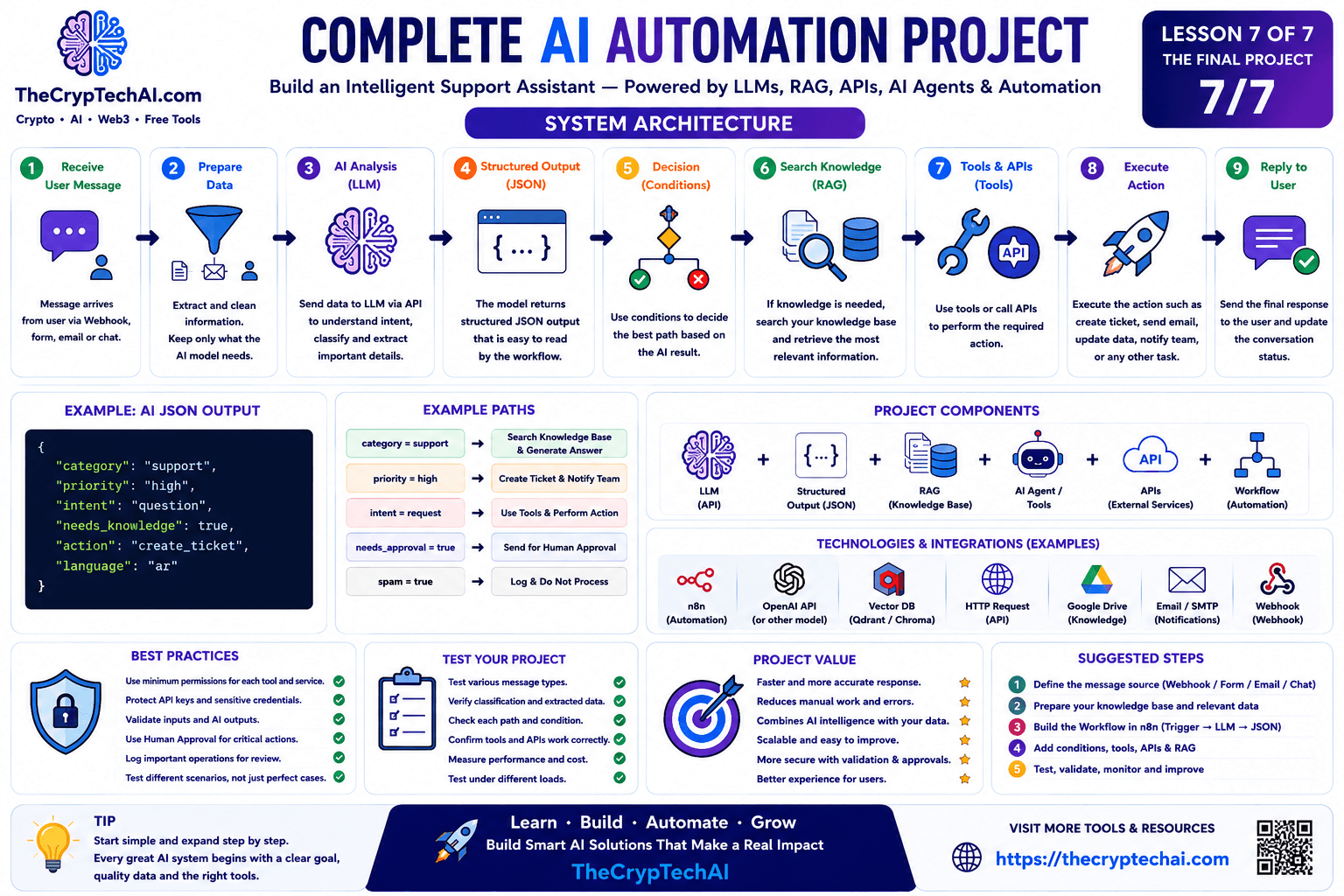
Understanding the AI Automation Project
The goal is to create a system that receives an incoming message and transforms it into a sequence of organized steps:
User Message → Workflow → LLM → Structured Output → Decision → RAG / Tools → Action → Final Response
Instead of asking one AI model to handle everything, we divide the system into components, with each component performing a specific task.
1. Receive the User Message
The process begins when a new message or request enters the system.
The message could come from:
- A website contact form.
- A Webhook.
- An email.
- A chatbot.
- An external application through an API.
The incoming message acts as the Trigger that starts the Workflow.
2. Prepare the Data
Before sending information to the AI model, the Workflow should extract, clean, and prepare the data required for the task.
For example, it may need:
- The message text.
- The user's name.
- The email address.
- The message language.
- An order or ticket number when available.
It is usually better to send only the information required for the task instead of providing unnecessary data to the model.
3. Analyze the Message with an LLM
After preparing the data, the Workflow sends the message to an LLM through an API.
The model can analyze information such as:
- The request category.
- The priority level.
- The user's intent.
- The message language.
- Whether external knowledge is required.
- The suggested action.
The LLM is being used for understanding and analysis rather than being responsible for executing every action itself.
4. Return a Structured Output
To make the AI result easy for the Workflow to process, we can request structured data instead of a long paragraph.
For example:
{
"category": "support",
"priority": "high",
"intent": "question",
"needs_knowledge": true,
"action": "create_ticket",
"language": "en"
}
The Workflow can now read each field separately and use these values in the following decision steps.
5. Make Decisions Inside the Workflow
After receiving the JSON result, the Workflow can use IF or Switch conditions to select the correct path.
For example:
- category = support → Route the message to the support path.
- priority = high → Create a ticket and send an immediate notification.
- needs_knowledge = true → Search the knowledge base.
- action = create_ticket → Call the ticket creation tool.
- spam = true → Stop processing or log the message.
This demonstrates how AI can work together with deterministic automation rules instead of replacing them completely.
6. Use RAG to Search Knowledge
If the user's question requires information from a private or specialized knowledge source, the system can use RAG.
The process might look like:
User Question → Search Knowledge Base → Retrieve Relevant Information → LLM → Answer
The retrieval stage finds information related to the user's question and provides it to the language model as additional context.
This allows the knowledge source to be updated without retraining the entire language model whenever documents change.
7. Use AI Agents and Tools
Some parts of an AI Automation Project may require the system to choose between different tools depending on the task.
An AI Agent could have access to tools such as:
- Database search.
- External APIs.
- Ticket creation.
- File processing.
- Knowledge retrieval.
- Notifications.
The Agent can determine which available tool is appropriate, while the application or automation system executes the actual tool according to defined permissions and rules.
8. Execute the Action
Once the appropriate action has been determined, the Workflow can execute it.
The action might include:
- Creating a support ticket.
- Sending an email.
- Saving information to a database.
- Sending a notification to the team.
- Updating an order status.
- Creating a follow-up task.
Sensitive actions should remain protected by clear rules and should not be executed by an AI system without appropriate controls.
9. Generate the Final Response
After the required steps are complete, the system can prepare the final response for the user.
If RAG was used, the model can use the retrieved information when generating the response. If an action such as creating a ticket was performed, the result of that action can also be included.
For example:
Your support request has been created successfully and sent to the appropriate team.
Where Do APIs Fit Into the Project?
APIs act as bridges between different components of the system.
The project may use APIs to:
- Send a Prompt to an AI model.
- Retrieve information from an external service.
- Create a support ticket.
- Send a message or notification.
- Update information in another application.
This makes APIs an important part of connecting AI models with real applications and services.
How Do All the Components Work Together?
The architecture can be summarized as:
LLM + Structured Output + RAG + AI Agent/Tools + APIs + Workflow Automation
Each component has a different role:
- LLM: Understands and analyzes language.
- Structured Output: Converts AI results into organized data.
- RAG: Retrieves relevant information from a knowledge source.
- AI Agent: Selects appropriate tools or steps when dynamic decisions are required.
- APIs: Connect the AI system with models and external services.
- Workflow: Controls the sequence, rules, and execution of the process.
Do We Always Need Every Component?
No. A good AI system should not use a technology simply because it is available.
If the task only requires message classification, this may be enough:
Trigger → LLM → JSON → Condition → Action
RAG should be added when external knowledge is required, while an Agent becomes useful when the system needs to dynamically choose between several tools or possible steps.
Security and Permissions
Security becomes an essential part of the architecture when an AI Automation Project connects to real applications and services.
- Use the minimum permissions required for each tool.
- Do not expose API Keys inside Prompts or user-visible content.
- Validate data before executing actions.
- Define clear limits for what an Agent can do.
- Use Human Approval for sensitive actions when appropriate.
- Log important operations for later review.
You can visit the
TheCrypTechAI Security Center
to learn more about digital security and protection concepts.
Human Approval for Sensitive Actions
Not every part of an AI system needs to operate completely autonomously.
Human approval can be required before actions such as:
- Deleting important data.
- Sending important messages on behalf of a user.
- Performing financial transactions.
- Changing sensitive information.
- Granting new permissions.
This allows AI automation to remain useful while keeping human control where the potential impact is higher.
Testing the Project
A complete project should not be tested with only one ideal message.
Test several scenarios, including:
- A normal support request.
- A high-priority message.
- An unclear request.
- A message in another language.
- A spam message.
- An API failure.
- A knowledge search that returns no useful information.
Testing different scenarios helps identify problems before the system is used in production.
Monitor Cost and Performance
After deployment, the project should be monitored continuously.
Useful metrics include:
- Number of AI requests.
- Token usage.
- Workflow execution time.
- Error rate.
- Classification accuracy.
- Number of cases requiring human intervention.
These measurements can help improve the system over time instead of relying only on assumptions.
Start Simple and Expand Gradually
You do not need to build the complete architecture on the first day.
A simple first version could be:
Message → AI Classification → JSON → Action
Then additional capabilities can be added gradually:
RAG → Tools → Agent → Human Approval → Monitoring
This approach makes the project easier to test, maintain, and improve.
External Learning Resource
To explore practical AI systems inside automation Workflows, you can review the
official n8n Advanced AI documentation
for additional information about integrating AI models and tools with automation.
Summary
This AI Automation Project demonstrates that a practical AI system does not depend on a language model alone. Instead, multiple components work together to understand data, retrieve information, make decisions, and execute controlled actions.
LLMs can understand language, Structured Outputs organize results, RAG provides relevant knowledge, and AI Agents can select tools when required, while APIs and Workflows connect the components and control execution.
By completing this learning path, we have moved from understanding LLMs to designing a complete system that combines AI + Data + Tools + Automation in one scalable architecture.
اختبر فهمك
Check Your Understanding
سؤالان سريعان لتثبيت أهم ما تعلمته.
Two quick questions to reinforce the key ideas.