
ربط الذكاء الاصطناعي بالأتمتة وWorkflows | Connecting AI with Automation and Workflows
تعلّم ببساطة، خطوة بخطوة
Learn simply, step by step
معلومة واضحة، ثم خطوة جديدة.
Clear knowledge, one step at a time.
ربط الذكاء الاصطناعي بالأتمتة وWorkflows Connecting AI with Automation and Workflows
ما هي أتمتة الذكاء الاصطناعي؟
تعني أتمتة الذكاء الاصطناعي دمج نماذج AI داخل أنظمة الأتمتة وWorkflows حتى تتمكن من تحليل البيانات وفهم المحتوى والمساعدة في تحديد الإجراء المناسب، بدل الاعتماد فقط على خطوات ثابتة ومحددة مسبقًا.
الفكرة الأساسية هي أن الذكاء الاصطناعي يصبح جزءًا من الـWorkflow. يستقبل بيانات من خطوة سابقة، يحللها، ثم يعيد نتيجة يمكن لبقية خطوات الأتمتة استخدامها.
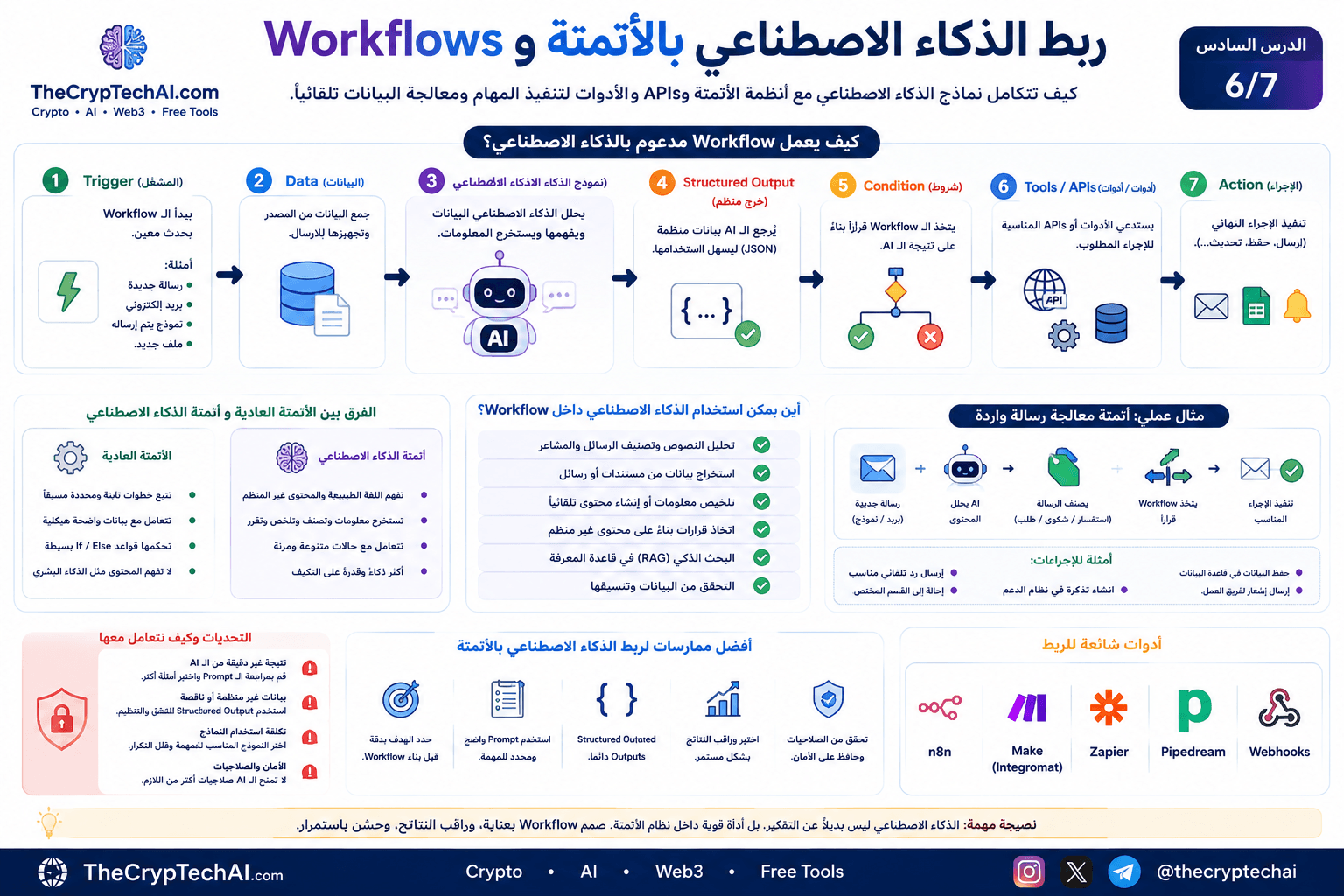
كيف يعمل AI داخل Workflow؟
يمكن أن يتكون Workflow مدعوم بالذكاء الاصطناعي من المراحل التالية:
Trigger → Data → AI Model → Structured Output → Condition → Tool / API → Action
لا يشترط وجود جميع هذه المراحل في كل مشروع، لكنها توضح كيف يمكن دمج المفاهيم التي تعلمناها سابقًا داخل نظام أتمتة واحد.
1. بداية الـWorkflow باستخدام Trigger
يبدأ الـWorkflow عادةً عند حدوث حدث معين يسمى Trigger.
على سبيل المثال:
- وصول رسالة جديدة.
- استلام بريد إلكتروني.
- إرسال نموذج من الموقع.
- إضافة ملف جديد.
- وصول بيانات من Webhook.
- تشغيل الـWorkflow في وقت محدد.
بعد حدوث الـTrigger تبدأ بقية خطوات الأتمتة تلقائيًا.
2. تجهيز البيانات
قبل إرسال البيانات إلى نموذج AI، من الأفضل تجهيز المعلومات التي يحتاجها فقط.
على سبيل المثال، إذا وصل بريد إلكتروني فقد نحتاج إلى:
- عنوان الرسالة.
- محتوى الرسالة.
- اسم المرسل.
- أي بيانات أخرى ضرورية للمهمة.
إرسال بيانات واضحة ومناسبة يساعد النموذج على تنفيذ المهمة بصورة أفضل، وقد يقلل أيضًا من استخدام Tokens غير الضرورية.
3. إرسال البيانات إلى نموذج AI
في هذه المرحلة يرسل الـWorkflow البيانات إلى نموذج الذكاء الاصطناعي من خلال API أو تكامل جاهز داخل منصة الأتمتة.
يمكن استخدام AI في مهام مثل:
- تصنيف الرسائل.
- استخراج معلومات من النص.
- تلخيص المحتوى.
- تحليل طلب المستخدم.
- إنشاء مسودة رد.
- تحديد Intent أو Category.
هنا تظهر أهمية كتابة Prompt واضح يحدد للنموذج المطلوب منه بدقة.
4. استخدام Structured Output
في أتمتة الذكاء الاصطناعي لا نحتاج دائمًا إلى إجابة طويلة موجهة للإنسان. غالبًا نحتاج إلى بيانات منظمة تستطيع خطوات الـWorkflow التالية قراءتها.
على سبيل المثال، يمكن أن يعيد AI نتيجة شبيهة بهذا الشكل:
{
  "category": "support",
  "priority": "high",
  "language": "ar",
  "needs_reply": true
}
هذه البيانات أسهل بكثير في المعالجة من فقرة نصية غير منظمة.
وهنا نستفيد من مفهوم Structured Outputs الذي تعلمناه في الدرس السابق من هذا المسار.
5. اتخاذ القرار داخل الـWorkflow
بعد الحصول على نتيجة AI، يستطيع الـWorkflow استخدام شروط مثل IF أو Switch لتحديد المسار المناسب.
على سبيل المثال:
- إذا كانت الرسالة Support → إرسالها إلى فريق الدعم.
- إذا كانت Sales → إرسالها إلى قسم المبيعات.
- إذا كانت Spam → عدم متابعة المعالجة.
- إذا كانت الأولوية High → إرسال إشعار فوري.
بهذه الطريقة يساعد AI على فهم المحتوى، بينما تتولى قواعد الـWorkflow التحكم في الإجراء الذي سيتم تنفيذه.
6. ربط AI مع Tools وAPIs
يمكن للـWorkflow بعد ذلك استدعاء أداة أو API لتنفيذ المهمة المطلوبة.
مثل:
- إضافة بيانات إلى قاعدة بيانات.
- إنشاء مهمة جديدة.
- إرسال بريد إلكتروني.
- إرسال Notification.
- تحديث سجل داخل تطبيق.
- قراءة معلومات من خدمة خارجية.
وهذا يربط بين ما تعلمناه عن APIs وبين أنظمة الأتمتة والذكاء الاصطناعي.
مثال عملي على AI Automation Workflow
لنفترض أن موقعًا يستقبل رسائل من الزوار ونريد معالجة هذه الرسائل تلقائيًا.
يمكن بناء الـWorkflow بالشكل التالي:
New Message → AI Analysis → Classification → IF / Switch → Appropriate Action
- يصل طلب جديد من نموذج الموقع.
- يرسل الـWorkflow محتوى الرسالة إلى نموذج AI.
- يحدد النموذج نوع الرسالة وأولويتها.
- تعود النتيجة في صيغة منظمة.
- يفحص الـWorkflow التصنيف.
- يتم اختيار المسار المناسب.
- يُنفذ الإجراء النهائي تلقائيًا.
قد يكون الإجراء النهائي إنشاء مهمة، أو حفظ البيانات، أو إرسال إشعار، أو تجهيز رد للمستخدم.
الأتمتة العادية أم AI Automation؟
الأتمتة التقليدية ممتازة عندما تكون القواعد واضحة ويمكن تحديدها مسبقًا.
مثال:
إذا كانت القيمة أكبر من 100 → نفّذ الإجراء A.
لكن بعض المهام تحتاج إلى فهم محتوى غير منظم مثل الرسائل والمقالات والأسئلة. هنا يمكن أن تكون أتمتة الذكاء الاصطناعي مفيدة.
على سبيل المثال، تحديد ما إذا كانت رسالة العميل شكوى أو سؤالًا أو طلب شراء قد يكون أصعب باستخدام قواعد ثابتة فقط، بينما يستطيع نموذج AI تحليل معنى النص والمساعدة في تصنيفه.
أين يمكن استخدام RAG؟
يمكن أيضًا إضافة RAG إلى الـWorkflow عندما يحتاج نموذج AI إلى معلومات من قاعدة معرفة خاصة.
مثال:
Question → Retrieve Knowledge → AI → Structured Answer → Workflow Action
يمكن استخدام ذلك في أنظمة الدعم أو قواعد المعرفة التي تحتاج إلى البحث في مستندات أو بيانات محددة قبل إنشاء الإجابة.
متى نستخدم AI Agent داخل Workflow؟
ليس كل Workflow يحتاج إلى AI Agent.
إذا كانت الخطوات معروفة مسبقًا، فمن الأفضل غالبًا استخدام Workflow ثابت لأنه أبسط وأسهل في الاختبار والتحكم.
لكن إذا كانت المهمة تحتاج إلى اختيار ديناميكي بين عدة أدوات أو تحديد الخطوة التالية حسب النتائج، فقد يكون AI Agent مناسبًا.
يمكن أن يصبح Agent نفسه خطوة داخل نظام الأتمتة:
Trigger → Agent → Choose Tool → Execute → Result → Workflow
التحقق من نتائج AI
من الأخطاء المهمة افتراض أن كل نتيجة يولدها AI صحيحة.
لذلك يجب تصميم الـWorkflow بحيث يتحقق من البيانات المهمة قبل تنفيذ الإجراءات الحساسة.
يمكن استخدام:
- قواعد Validation.
- Structured Outputs.
- شروط IF/Switch.
- حدود للقيم المقبولة.
- مراجعة بشرية عند القرارات المهمة.
كلما كان الإجراء أكثر حساسية، أصبحت عملية التحقق أكثر أهمية.
تكلفة AI Automation
الأتمتة التقليدية لا تحتاج دائمًا إلى نموذج AI، لذلك لا ينبغي إضافة الذكاء الاصطناعي إلى كل خطوة بدون سبب.
عند استخدام API لنموذج AI قد ترتبط التكلفة بعدد الطلبات والنموذج المستخدم وحجم المدخلات والمخرجات أو Tokens.
يمكن تقليل الاستخدام غير الضروري عن طريق إرسال المعلومات المطلوبة فقط، واختيار نموذج مناسب للمهمة، وعدم استدعاء AI عندما تستطيع قاعدة بسيطة تنفيذ نفس العمل.
أمان أتمتة الذكاء الاصطناعي
عند ربط AI بأنظمة حقيقية، يجب الانتباه إلى الصلاحيات والبيانات التي يستطيع الـWorkflow الوصول إليها.
- لا تمنح AI أو Workflow صلاحيات أكثر من اللازم.
- احمِ API Keys وCredentials.
- تحقق من المدخلات قبل تنفيذ الإجراءات الحساسة.
- استخدم تأكيدًا بشريًا عند الحاجة.
- سجل العمليات المهمة لمراجعتها لاحقًا.
- لا تعتمد على مخرجات AI وحدها في القرارات عالية المخاطر.
للمزيد حول حماية الأنظمة والبيانات، يمكنك زيارة
Security Center في TheCrypTechAI.
أفضل ممارسات AI Automation Workflows
- حدد الهدف من الـWorkflow قبل إضافة AI.
- استخدم Prompt واضحًا ومحددًا.
- استخدم Structured Output عندما تحتاج إلى بيانات يمكن للآلة معالجتها.
- اختبر الحالات المختلفة وليس المثال المثالي فقط.
- راقب الأخطاء والتكلفة والنتائج.
- استخدم أقل قدر ممكن من الصلاحيات.
- استخدم Automation عادية عندما لا تحتاج المهمة إلى AI.
وللتعمق أكثر في بناء أنظمة الأتمتة وربطها بالخدمات المختلفة، يمكنك مراجعة
وثائق n8n الرسمية حول Advanced AI
للتعرف على كيفية استخدام الذكاء الاصطناعي داخل Workflows والأتمتة.
الخلاصة
تسمح أتمتة الذكاء الاصطناعي بدمج قدرات نماذج AI مع Workflows وAPIs والأدوات لتنفيذ مهام أكثر مرونة، خاصة عند التعامل مع النصوص والبيانات غير المنظمة.
والفكرة ليست أن يستبدل AI نظام الأتمتة، بل أن يصبح أداة داخله: يقوم الـWorkflow بتشغيل الخطوات والتحكم في القواعد، بينما يساعد AI في المهام التي تحتاج إلى فهم أو تحليل أو تصنيف أو توليد بيانات.
بعد أن جمعنا LLMs وAPIs وStructured Outputs وRAG وAI Agents وAutomation، أصبحنا جاهزين في الدرس السابع لبناء مشروع AI متكامل يجمع هذه المفاهيم في مثال عملي واحد.
What Is AI Automation?
AI Automation Workflows combine AI models with automation systems so they can analyze data, understand content, and help determine the appropriate action instead of relying only on fixed predefined steps.
The main idea is that AI becomes one component inside a Workflow. It receives data from a previous step, processes it, and returns a result that the following automation steps can use.
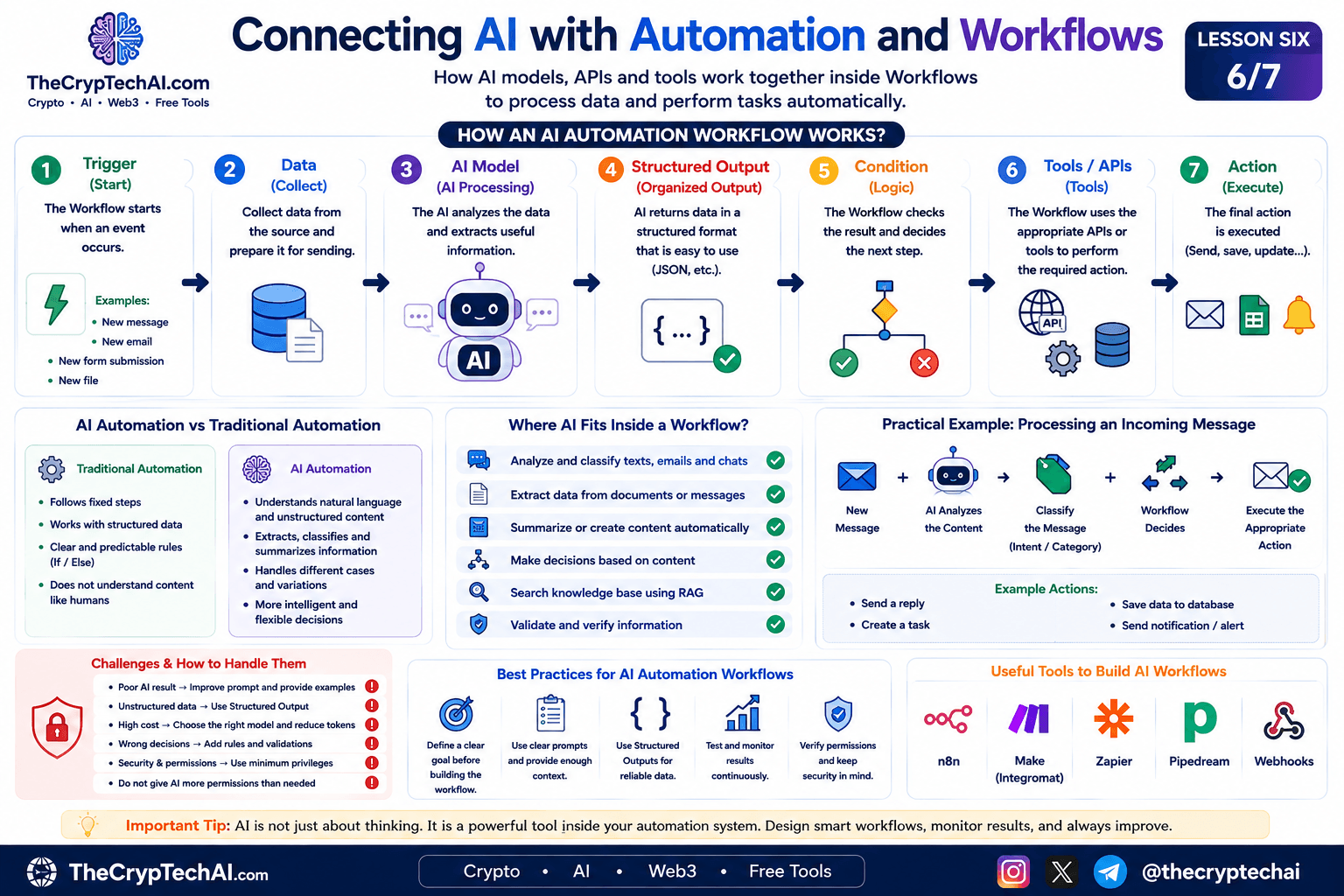
How Does AI Work Inside a Workflow?
A typical AI-powered Workflow can follow this structure:
Trigger → Data → AI Model → Structured Output → Condition → Tool / API → Action
Not every project needs all of these stages, but this structure demonstrates how the concepts we learned earlier can work together inside one automation system.
1. Starting the Workflow with a Trigger
A Workflow usually begins when a specific event occurs. This event is called a Trigger.
Examples include:
- A new message arrives.
- A new email is received.
- A website form is submitted.
- A new file is uploaded.
- Data arrives through a Webhook.
- A scheduled time is reached.
Once the Trigger occurs, the remaining automation steps can begin automatically.
2. Preparing the Data
Before sending information to an AI model, it is usually better to prepare only the data required for the task.
For example, when processing an email, the Workflow may need:
- The email subject.
- The message content.
- The sender's name.
- Any additional data required for the task.
Providing clear and relevant data can improve the model's output and may also reduce unnecessary token usage.
3. Sending Data to the AI Model
At this stage, the Workflow sends the prepared information to an AI model through an API or an integration provided by the automation platform.
AI can perform tasks such as:
- Classifying messages.
- Extracting information from text.
- Summarizing content.
- Analyzing user requests.
- Creating draft responses.
- Identifying intent or category.
A clear and specific Prompt is important because it tells the model exactly what it should do.
4. Using Structured Outputs
In AI Automation Workflows, we do not always need a long human-readable answer. Automation systems often need structured data that the next steps can process reliably.
For example, an AI model could return:
{
"category": "support",
"priority": "high",
"language": "en",
"needs_reply": true
}
This type of output is much easier for a Workflow to process than an unstructured paragraph.
This is where the Structured Outputs concept covered earlier in this learning path becomes especially useful.
5. Making Decisions Inside the Workflow
After receiving the AI result, the Workflow can use conditions such as IF or Switch to select the appropriate path.
For example:
- If the category is Support → send it to the support team.
- If the category is Sales → route it to the sales team.
- If the message is Spam → stop further processing.
- If the priority is High → send an immediate notification.
AI helps understand the content, while Workflow rules control which action is actually performed.
6. Connecting AI with Tools and APIs
The Workflow can then call a tool or API to perform the required action.
Examples include:
- Adding information to a database.
- Creating a new task.
- Sending an email.
- Sending a notification.
- Updating a record in another application.
- Retrieving information from an external service.
This connects the concepts of APIs, AI models, and automation into one system.
A Practical AI Automation Workflow Example
Imagine a website that receives messages from visitors and needs to process them automatically.
The Workflow could look like this:
New Message → AI Analysis → Classification → IF / Switch → Appropriate Action
- A new request arrives from the website form.
- The Workflow sends the message content to an AI model.
- The model identifies the message category and priority.
- The result is returned in a structured format.
- The Workflow checks the classification.
- The appropriate path is selected.
- The final action is executed automatically.
The final action might create a task, store information, send a notification, or prepare a response for the user.
Traditional Automation or AI Automation?
Traditional automation works very well when rules are clear and can be defined in advance.
For example:
If value > 100 → Execute Action A
However, some tasks require understanding unstructured content such as emails, messages, documents, or questions. This is where AI Automation Workflows can be useful.
For example, determining whether a customer message is a complaint, question, or sales request can be difficult using fixed rules alone. An AI model can analyze the meaning of the text and help classify it.
Where Can RAG Be Used?
RAG can also be added to a Workflow when the AI model needs information from a private or specialized knowledge source.
For example:
Question → Retrieve Knowledge → AI → Structured Answer → Workflow Action
This can be useful for support systems or knowledge-base applications that need to search specific documents before generating a response.
When Should an AI Agent Be Used Inside a Workflow?
Not every Workflow requires an AI Agent.
If the required steps are already known, a fixed Workflow is often simpler, easier to test, and easier to control.
However, if the task requires dynamically selecting between several tools or deciding the next step according to previous results, an AI Agent may be appropriate.
An Agent can itself become one step inside an automation system:
Trigger → Agent → Choose Tool → Execute → Result → Workflow
Validating AI Results
A common mistake is assuming that every result generated by AI is correct.
A Workflow should therefore validate important data before performing sensitive actions.
Validation methods can include:
- Validation rules.
- Structured Outputs.
- IF/Switch conditions.
- Acceptable value limits.
- Human review for important decisions.
The more sensitive the final action is, the more important validation becomes.
The Cost of AI Automation
Traditional automation does not always require an AI model, so AI should not be added to every step without a clear reason.
When an AI API is used, costs may depend on the selected model, number of requests, and the amount of input and output data or tokens.
Unnecessary usage can be reduced by sending only relevant information, selecting an appropriate model for the task, and avoiding AI calls when a simple rule can perform the same job.
AI Automation Security
When AI is connected to real systems, it is important to control the permissions and data available to the Workflow.
- Do not give AI or the Workflow more permissions than necessary.
- Protect API Keys and Credentials.
- Validate inputs before sensitive actions.
- Use human confirmation when appropriate.
- Log important actions for later review.
- Do not rely only on AI output for high-risk decisions.
For more information about protecting systems and data, visit the
TheCrypTechAI Security Center.
Best Practices for AI Automation Workflows
- Define the Workflow goal before adding AI.
- Use clear and specific Prompts.
- Use Structured Outputs when machine-readable data is required.
- Test different scenarios, not only the ideal case.
- Monitor errors, costs, and results.
- Use the minimum permissions required.
- Use traditional automation when AI is unnecessary.
To explore practical ways to integrate AI with automation systems, you can also review the
official n8n Advanced AI documentation
for examples of using AI inside Workflows and automation.
Summary
AI Automation Workflows combine AI models with Workflows, APIs, and tools to perform more flexible tasks, especially when working with text and other unstructured information.
The goal is not for AI to replace the automation system. Instead, AI becomes a tool inside it: the Workflow manages execution and rules, while AI helps with tasks that require understanding, analysis, classification, or data generation.
Now that we have connected LLMs, APIs, Structured Outputs, RAG, AI Agents, and Automation, we are ready for lesson seven: building a complete AI project that combines these concepts in one practical system.
اختبر فهمك
Check Your Understanding
سؤالان سريعان لتثبيت أهم ما تعلمته.
Two quick questions to reinforce the key ideas.