
تحليل الروابط والملفات المشبوهة | Analyzing Suspicious Links & Files
تعلّم ببساطة، خطوة بخطوة
Learn simply, step by step
معلومة واضحة، ثم خطوة جديدة.
Clear knowledge, one step at a time.
تحليل الروابط والملفات المشبوهة Analyzing Suspicious Links & Files
قد يبدأ كثير من الهجمات الإلكترونية برسالة تبدو طبيعية، أو رابط تسجيل دخول، أو ملف مرفق. لذلك يُعد تحليل الروابط والملفات المشبوهة مهارة مهمة تساعدك على اكتشاف علامات الخطر قبل الضغط على الرابط أو فتح الملف.
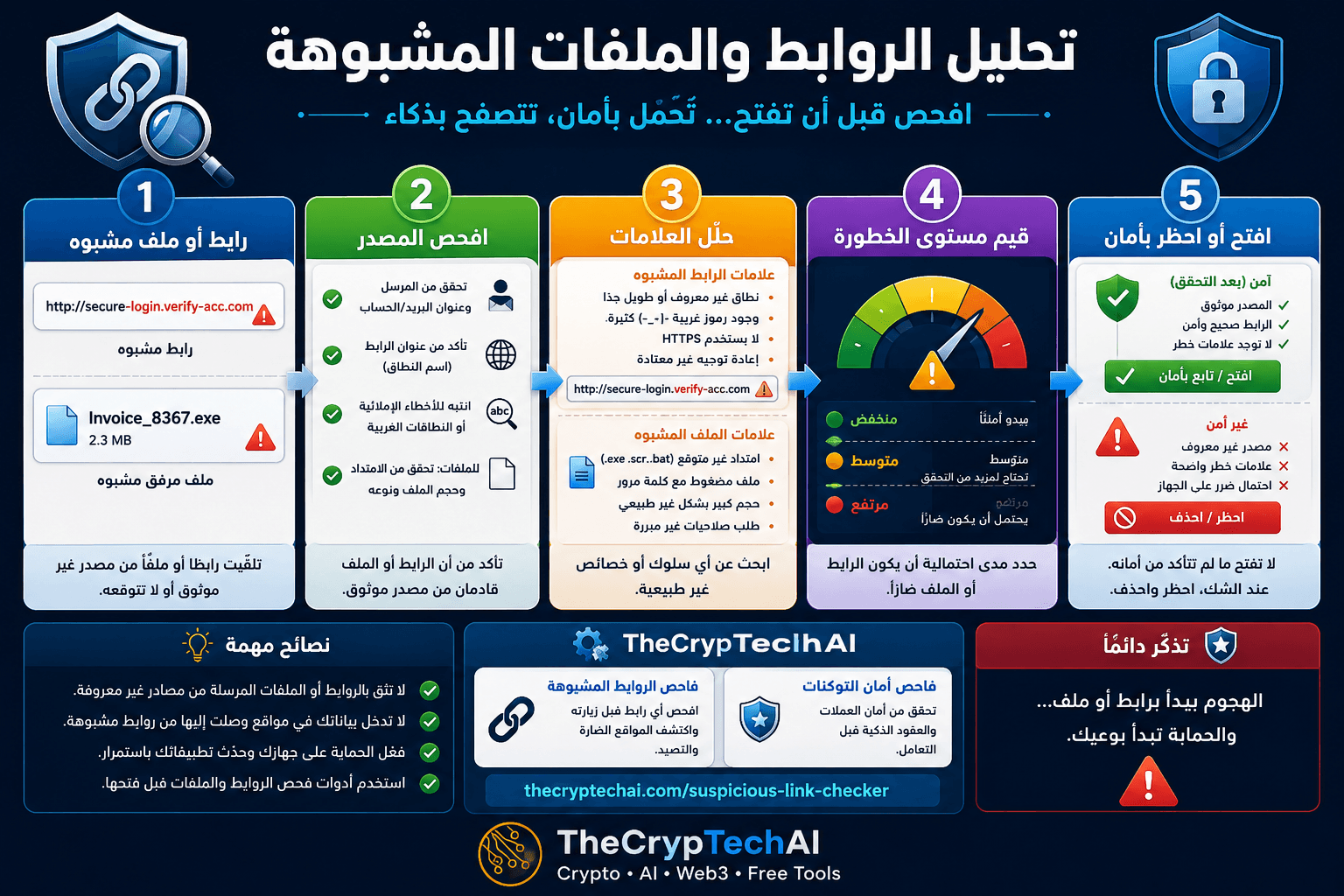
كيف تبدأ تحليل الروابط والملفات المشبوهة؟
قبل فتح أي رابط أو ملف غير متوقع، اسأل أولًا: من أرسله؟ هل كنت أنتظر هذه الرسالة؟ وهل يتطابق عنوان المرسل واسم الموقع مع الجهة الحقيقية؟
حتى إذا بدا اسم المرسل مألوفًا، لا تعتمد على الاسم وحده، فقد تحاول رسائل التصيد تقليد الشركات والخدمات المعروفة.
افحص الرابط قبل الضغط عليه
راجع اسم النطاق بعناية وابحث عن الأخطاء الإملائية أو الحروف الإضافية والنطاقات الغريبة. ولا تعتبر وجود HTTPS وحده دليلًا على أن الموقع آمن، فقد تستخدم المواقع الاحتيالية اتصالًا مشفرًا أيضًا.
يمكنك استخدام
فاحص الروابط المشبوهة من TheCrypTechAI
لإجراء فحص أولي للرابط قبل زيارته.
انتبه إلى الملفات والمرفقات غير المتوقعة
تعامل بحذر مع أي ملف لم تكن تتوقع استلامه، خصوصًا إذا جاء من مصدر غير معروف أو صاحبته رسالة تطلب منك فتحه بسرعة.
راجع اسم الملف وامتداده ومصدره قبل فتحه، ولا تشغّل ملفًا مشبوهًا لمجرد أن الرسالة تبدو رسمية.
ابحث عن علامات التصيد والاحتيال
من العلامات التي تستحق الانتباه: الرسائل المستعجلة، والتهديد بإغلاق الحساب، وطلبات إدخال كلمة المرور أو البيانات الحساسة، والعروض غير المتوقعة، والروابط التي تقود إلى نطاق مختلف عن الموقع الحقيقي.
توضح
إرشادات CISA للتعرف على التصيد والإبلاغ عنه
أهمية التحقق من الرسائل والروابط المشبوهة وتجنب التفاعل معها قبل التأكد من مصدرها.
قيّم مستوى الخطورة قبل اتخاذ القرار
بعد فحص المصدر والرابط أو الملف، قيّم مستوى الخطر. إذا كان المصدر مجهولًا، أو ظهرت عدة علامات تحذيرية، أو طُلب منك إدخال بيانات حساسة، فالأفضل عدم فتح المحتوى أو تحميله حتى يتم التحقق منه.
أما إذا تأكدت من المصدر والسياق ولم تظهر علامات خطر، فيمكنك المتابعة بحذر مع الحفاظ على تحديث الجهاز وبرامج الحماية.
ماذا تفعل إذا تفاعلت مع محتوى مشبوه؟
إذا أدخلت كلمة مرور في موقع مشبوه، غيّرها فورًا من الموقع الرسمي، وفعّل المصادقة الثنائية، وراجع جلسات تسجيل الدخول. وإذا قمت بتنزيل ملف مشبوه، تجنب تشغيله وافحص جهازك باستخدام أدوات حماية موثوقة.
يمكنك الرجوع إلى
مركز الأمان في TheCrypTechAI
للوصول إلى المزيد من أدوات وإرشادات الحماية الرقمية.
قاعدة الدرس
افحص المصدر ← حلّل العلامات ← قيّم الخطورة ← قرر الفتح أو الحظر.
الهدف من تحليل الروابط والملفات المشبوهة ليس معرفة كل نوع من البرمجيات الضارة، بل اكتشاف الإشارات التي تخبرك بأن المحتوى يحتاج إلى التحقق قبل التعامل معه.
Many cyberattacks begin with an ordinary-looking message, login link, or unexpected attachment. Learning Analyzing Suspicious Links and Files helps you recognize warning signs before clicking a link, downloading a file, or exposing sensitive information.
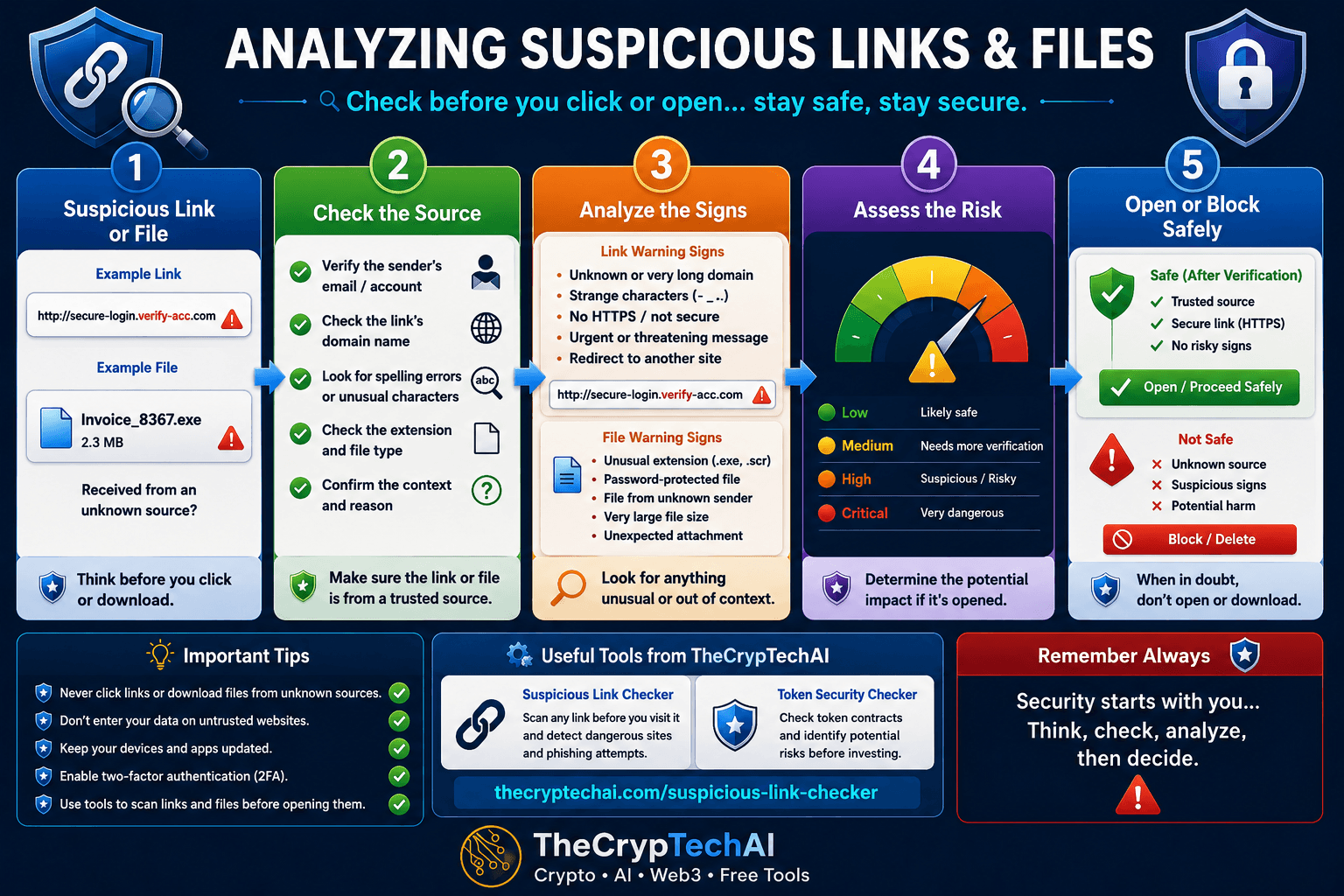
How to Start Analyzing Suspicious Links and Files
Before opening an unexpected link or file, ask a few simple questions: Who sent it? Were you expecting it? Does the sender's address and website domain match the real organization?
Do not trust a message simply because the sender's name looks familiar. Phishing attempts often imitate legitimate companies, services, and people.
Check the Link Before Clicking
Inspect the domain name carefully and look for spelling mistakes, extra characters, misleading subdomains, or unfamiliar domains. Remember that HTTPS alone does not prove that a website is trustworthy, because malicious websites can also use encrypted connections.
You can use the
TheCrypTechAI Suspicious Link Checker
for an initial check before visiting an unfamiliar link.
Be Careful With Unexpected Files
Treat unexpected attachments cautiously, especially when they come from unknown sources or arrive with messages pressuring you to open them immediately.
Check the filename, extension, source, and context before opening a file. Never run a suspicious attachment simply because the message appears professional or urgent.
Recognize Phishing and Scam Warning Signs
Common warning signs include urgent messages, threats to suspend an account, requests for passwords or sensitive information, unexpected offers, and links that lead to domains different from the legitimate website.
You can also review
CISA guidance on recognizing and reporting phishing
for additional information about identifying suspicious messages and links.
Assess the Risk Before Making a Decision
After checking the source and analyzing the link or file, assess the potential risk. If the source is unknown, several warning signs appear, or the content requests sensitive information, avoid opening or downloading it until you can verify it.
If the source and context have been verified and no meaningful warning signs appear, you can proceed cautiously while keeping your device and security software updated.
What If You Already Interacted With Suspicious Content?
If you entered a password on a suspicious website, change it immediately through the official website, enable two-factor authentication, and review active login sessions. If you downloaded a suspicious file, avoid running it and scan your device using trusted security software.
For more digital security tools and practical guides, visit the
TheCrypTechAI Security Center
.
Key Lesson
Check the source → Analyze the signs → Assess the risk → Open or block.
The goal of Analyzing Suspicious Links and Files is not to identify every type of malware yourself. The important skill is recognizing when a link or file requires additional verification before you interact with it.
اختبر فهمك
Check Your Understanding
سؤالان سريعان لتثبيت أهم ما تعلمته.
Two quick questions to reinforce the key ideas.