
اكتشاف التصيد والهندسة الاجتماعية المتقدمة | Advanced Phishing & Social Engineering
تعلّم ببساطة، خطوة بخطوة
Learn simply, step by step
معلومة واضحة، ثم خطوة جديدة.
Clear knowledge, one step at a time.
اكتشاف التصيد والهندسة الاجتماعية المتقدمة Advanced Phishing & Social Engineering
لا تعتمد الهجمات الإلكترونية دائمًا على اختراق الأجهزة أو اكتشاف ثغرات تقنية. في كثير من الحالات يحاول المهاجم خداع الشخص نفسه للحصول على كلمة مرور أو رمز تحقق أو معلومات حساسة. لذلك يساعد فهم التصيد والهندسة الاجتماعية على اكتشاف محاولات التلاعب قبل الوقوع فيها.
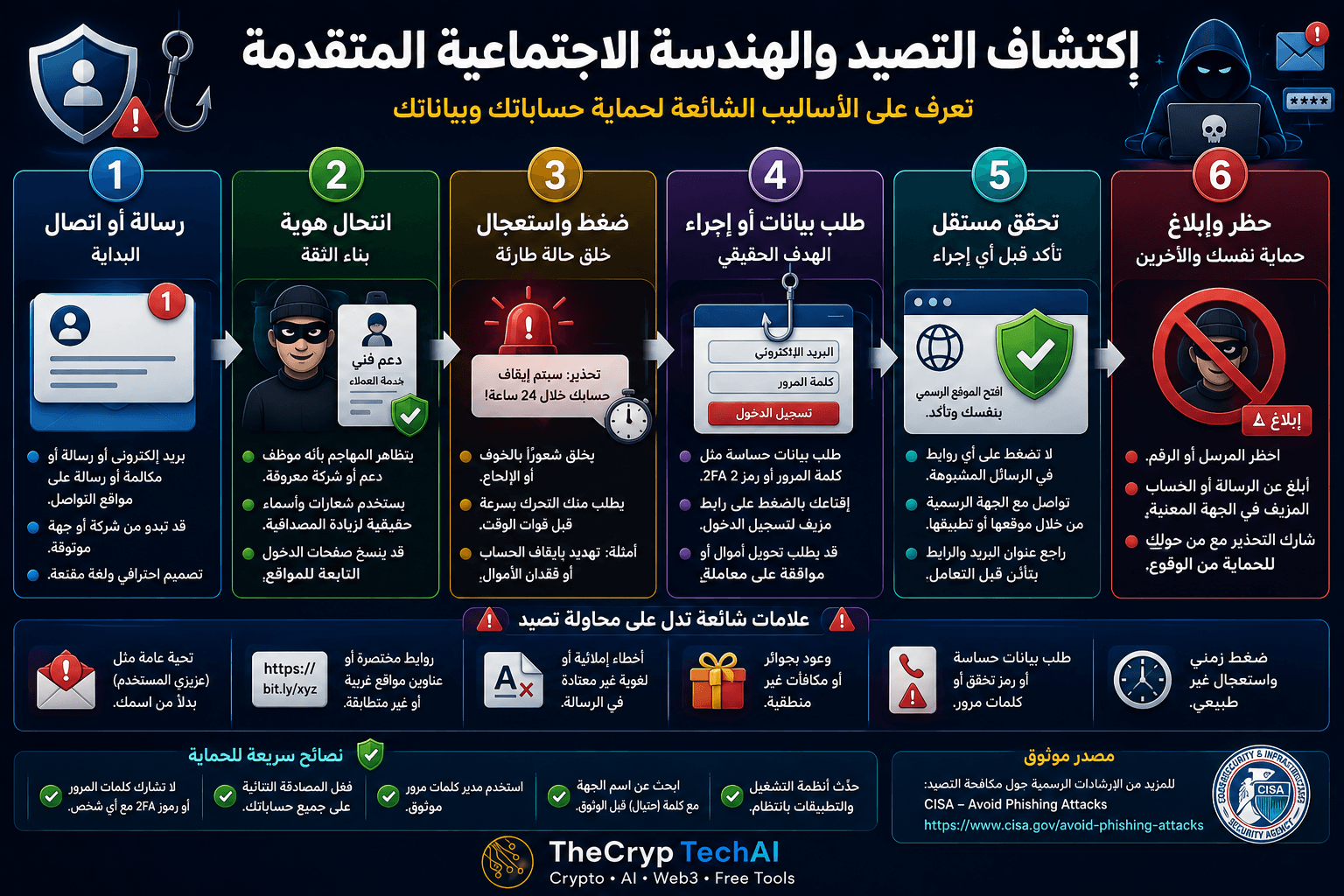
كيف تبدأ محاولات التصيد والهندسة الاجتماعية؟
قد تبدأ المحاولة برسالة بريد إلكتروني أو رسالة نصية أو مكالمة أو رسالة عبر إحدى منصات التواصل. وقد تبدو الرسالة وكأنها صادرة من بنك أو منصة تداول أو شركة معروفة أو حتى شخص تعرفه.
الهدف الأول للمهاجم غالبًا هو جذب انتباهك وبناء قدر كافٍ من الثقة حتى تتفاعل مع الرسالة.
انتبه إلى انتحال الهوية
قد يستخدم المهاجم اسم شركة حقيقية أو شعارها أو صورة شخص تعرفه، وقد ينشئ عنوان بريد أو موقعًا يشبه العنوان الأصلي بدرجة كبيرة.
وجود شعار معروف أو اسم مألوف لا يثبت أن الرسالة حقيقية. تحقق دائمًا من عنوان المرسل واسم النطاق والقناة التي تم التواصل معك من خلالها.
احذر الضغط والاستعجال
من أشهر أساليب التصيد والهندسة الاجتماعية محاولة منع الضحية من التفكير بهدوء. قد يخبرك المهاجم أن حسابك سيتوقف خلال دقائق، أو أن هناك عملية مالية عاجلة، أو أنك ربحت جائزة يجب المطالبة بها فورًا.
عندما تحاول الرسالة إجبارك على اتخاذ قرار سريع، توقف ولا تنفذ الطلب مباشرة.
لا تشارك كلمات المرور أو رموز التحقق
قد يكون الهدف الحقيقي من الرسالة الحصول على كلمة المرور أو رمز المصادقة الثنائية 2FA أو رمز استعادة الحساب أو دفعك إلى تسجيل الدخول عبر صفحة مزيفة.
لا ترسل بيانات تسجيل الدخول أو رموز التحقق استجابة لرسالة أو مكالمة غير متوقعة، ولا تدخلها في صفحة وصلت إليها من رابط مشبوه.
تحقق من الطلب بطريقة مستقلة
إذا ادعى شخص أنه يمثل شركة أو منصة تستخدمها، لا تعتمد على بيانات الاتصال أو الرابط الموجود في الرسالة نفسها.
افتح التطبيق الرسمي أو اكتب عنوان الموقع بنفسك، ثم تحقق من وجود التنبيه أو تواصل مع الدعم من خلال القنوات الرسمية.
وإذا احتوت الرسالة على رابط غير مألوف، يمكنك استخدام
فاحص الروابط المشبوهة من TheCrypTechAI
لإجراء فحص أولي قبل زيارة الرابط.
علامات تساعدك على اكتشاف محاولة التصيد
انتبه بشكل خاص إلى الرسائل التي تجمع أكثر من علامة تحذيرية، مثل الاستعجال الشديد، أو طلب معلومات حساسة، أو نطاق غير مألوف، أو رابط مختلف عن الموقع الرسمي، أو عرض غير متوقع، أو محاولة إقناعك بتجاوز إجراءات الأمان المعتادة.
وجود خطأ إملائي قد يكون علامة إضافية، لكن الرسالة المكتوبة بشكل احترافي ليست بالضرورة آمنة؛ فمحاولات الاحتيال الحديثة قد تكون مقنعة جدًا.
ماذا تفعل عند اكتشاف محاولة احتيال؟
لا تضغط على الرابط ولا ترسل أي بيانات. احظر المرسل عند الحاجة، واستخدم خاصية الإبلاغ عن التصيد أو الاحتيال الموجودة في البريد الإلكتروني أو المنصة.
إذا كنت قد أدخلت كلمة مرور بالفعل، غيّرها من الموقع الرسمي وراجع الجلسات والأجهزة المتصلة وفعّل المصادقة الثنائية إذا لم تكن مفعلة.
للمزيد من خطوات حماية الحسابات والأجهزة، انتقل إلى
مركز الأمان في TheCrypTechAI
.
مصدر موثوق لفهم التصيد الإلكتروني
يمكنك أيضًا مراجعة
إرشادات CISA للتعرف على التصيد والإبلاغ عنه
للتعرف على علامات الرسائل الاحتيالية وكيفية التعامل معها بأمان.
قاعدة الدرس
رسالة أو اتصال ← تحقق من الهوية ← لا تستجب للضغط ← لا تشارك البيانات ← تحقق بشكل مستقل ← احظر وأبلغ.
أفضل دفاع ضد التصيد والهندسة الاجتماعية هو عدم اتخاذ القرارات الأمنية تحت الضغط. توقف، وتحقق من الطلب من مصدر مستقل، ثم قرر ما إذا كان التواصل حقيقيًا قبل مشاركة أي معلومات أو تنفيذ أي إجراء.
Cyberattacks do not always depend on hacking devices or exploiting technical vulnerabilities. In many cases, attackers manipulate people into revealing passwords, verification codes, or sensitive information. Understanding Advanced Phishing and Social Engineering can help you recognize these manipulation attempts before becoming a victim.
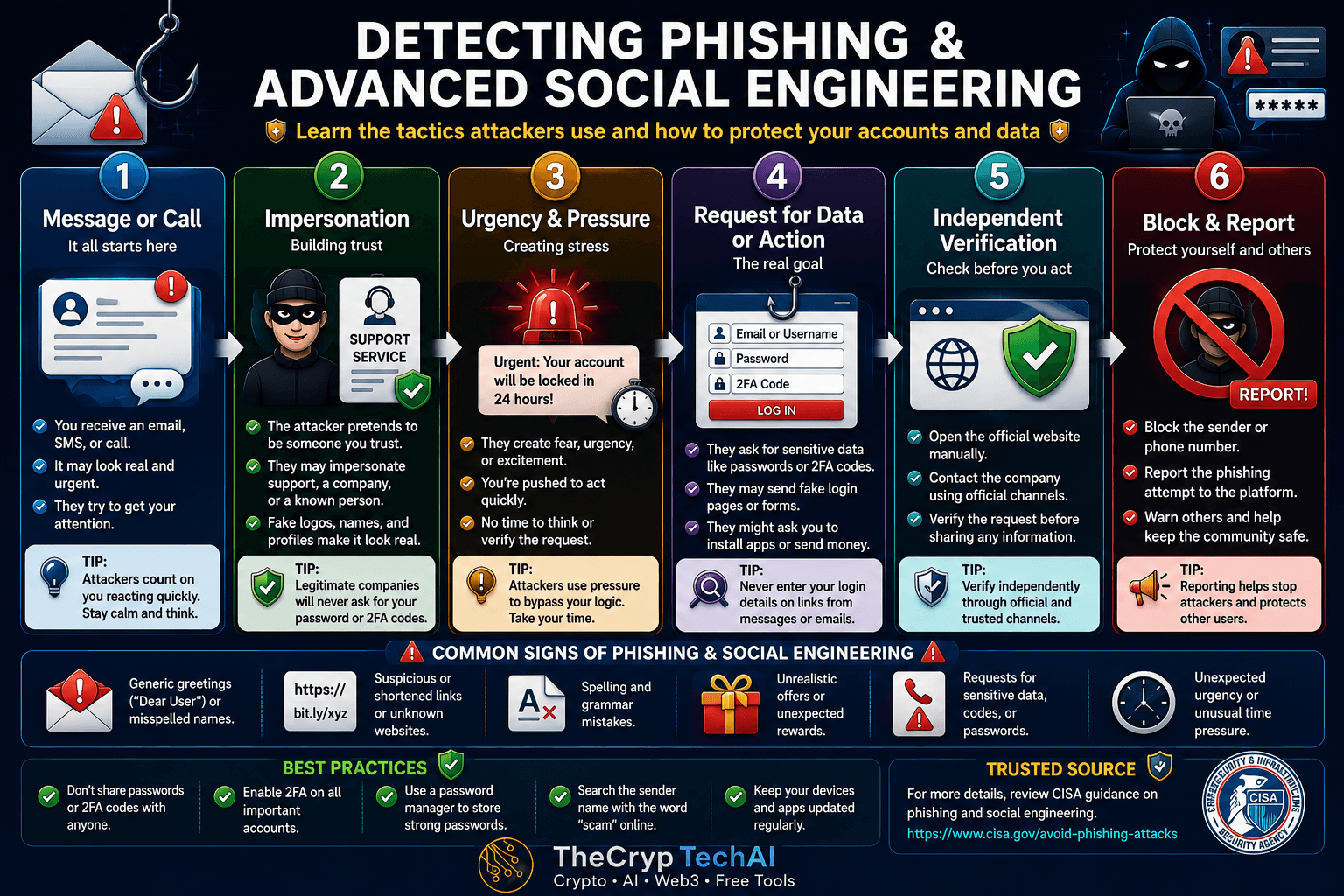
How Do Advanced Phishing and Social Engineering Attacks Begin?
An attack may begin with an email, text message, phone call, or social media message. It may appear to come from a bank, crypto platform, well-known company, support team, or even someone you know.
The attacker's first goal is often to capture your attention and build enough trust to make you respond or take an action.
Watch for Impersonation
Attackers may copy a legitimate company's name, logo, or visual identity. They may also create an email address or website domain that looks very similar to the real one.
A familiar name or professional-looking design does not prove that a message is legitimate. Always check the sender's address, domain name, and communication channel.
Recognize Urgency and Pressure
A common technique in Advanced Phishing and Social Engineering is creating pressure that prevents the victim from thinking carefully. An attacker might claim that your account will be suspended, a financial transaction requires immediate action, or a reward will expire soon.
If a message pressures you to act immediately, stop and verify the situation before doing anything.
Never Share Passwords or Verification Codes
The real objective may be to steal your password, two-factor authentication code, recovery code, financial information, or other sensitive data.
Never provide login credentials or verification codes in response to an unexpected message or call, and do not enter them into a login page reached through a suspicious link.
Verify Requests Independently
If someone claims to represent a company or platform you use, do not rely on the contact details or link provided in the suspicious message.
Open the official app or type the official website address yourself. Check whether the alert actually exists and contact support through the company's official channels when necessary.
If the message contains an unfamiliar link, you can use the
TheCrypTechAI Suspicious Link Checker
for an initial check before visiting it.
Common Warning Signs of Phishing
Be especially cautious when several warning signs appear together, such as extreme urgency, requests for sensitive information, unfamiliar domains, links that differ from the official website, unexpected rewards, or instructions to bypass normal security procedures.
Spelling mistakes can sometimes be a warning sign, but a professionally written message is not automatically safe. Modern phishing attempts can look highly convincing.
What Should You Do After Detecting an Attack?
Do not click suspicious links or provide any information. Block the sender when appropriate and use the phishing or scam reporting feature provided by your email service or platform.
If you already entered your password, change it through the official website, review active sessions and connected devices, and enable two-factor authentication if it is not already active.
For additional account and device protection guidance, visit the
TheCrypTechAI Security Center
.
Trusted Guidance on Phishing
You can also review
CISA guidance on recognizing and reporting phishing
for additional information about identifying suspicious communications and responding safely.
Key Lesson
Message or Call → Verify Identity → Resist Pressure → Protect Your Data → Verify Independently → Block and Report.
One of the strongest defenses against Advanced Phishing and Social Engineering is refusing to make security decisions under pressure. Stop, verify the request through an independent source, and only take action when you are confident the communication is legitimate.
اختبر فهمك
Check Your Understanding
سؤالان سريعان لتثبيت أهم ما تعلمته.
Two quick questions to reinforce the key ideas.