
بناء AI Agent متعدد الأدوات في n8n | Building a Multi-Tool AI Agent in n8n
تعلّم ببساطة، خطوة بخطوة
Learn simply, step by step
معلومة واضحة، ثم خطوة جديدة.
Clear knowledge, one step at a time.
بناء AI Agent متعدد الأدوات في n8n Building a Multi-Tool AI Agent in n8n
يتيح لك AI Agent متعدد الأدوات في n8n إنشاء وكيل ذكي
يمتلك عدة أدوات، ويستطيع تحديد الأداة المناسبة لكل مهمة واستخدامها تلقائيًا
بدل إنشاء Workflow منفصل لكل إجراء.
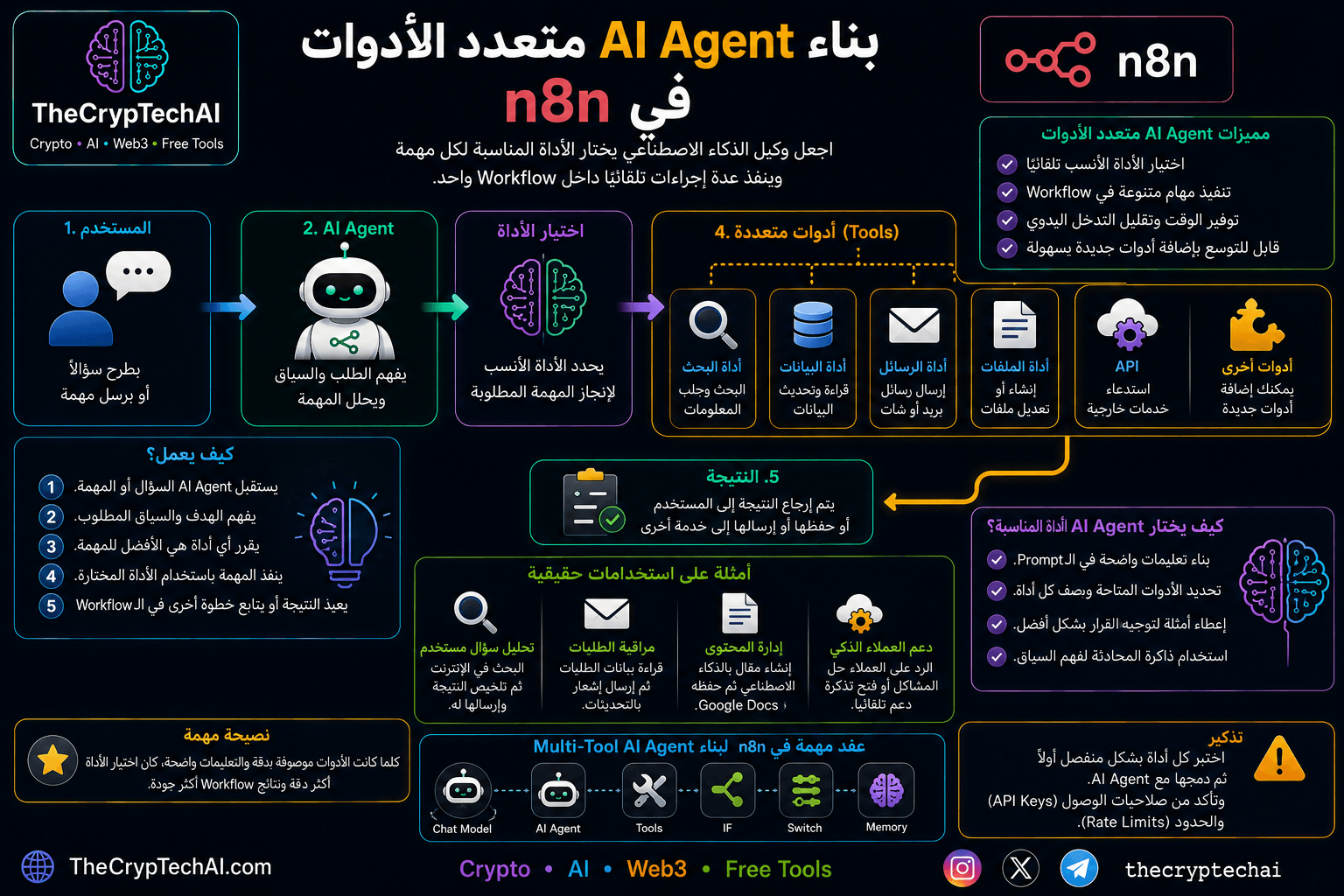
ما هو AI Agent متعدد الأدوات؟
بدل إعطاء الوكيل أداة واحدة فقط، يمكن ربطه بعدة أدوات مثل البحث،
وقواعد البيانات، والرسائل، والملفات وواجهات API.
يفهم AI Agent طلب المستخدم ثم يقرر أي أداة يحتاجها لتنفيذ المهمة.
كيف يعمل؟
- المستخدم: يرسل سؤالًا أو مهمة.
- AI Agent: يفهم الهدف والسياق.
- اختيار الأداة: يحدد الوكيل الأداة الأنسب للمهمة.
- تنفيذ المهمة: يستخدم الأداة المختارة لجلب البيانات أو تنفيذ الإجراء.
- النتيجة: يعيد النتيجة للمستخدم أو يكمل خطوة أخرى داخل Workflow.
مثال على استخدام عدة أدوات
تخيل AI Agent لخدمة العملاء لديه عدة أدوات. إذا سأله المستخدم عن حالة طلب،
يمكنه استخدام أداة قاعدة البيانات. وإذا طلب إرسال نسخة من الفاتورة،
يمكنه استخدام أداة البريد الإلكتروني.
وإذا احتاج إلى معلومات من خدمة خارجية، يستطيع استخدام API.
بهذه الطريقة يمكن للوكيل اختيار أدوات مختلفة حسب المهمة داخل نفس Workflow.
أمثلة على الأدوات
- Search Tool: للبحث عن المعلومات.
- Database Tool: لقراءة البيانات أو تحديثها.
- Messaging Tool: لإرسال الرسائل والتنبيهات.
- File Tool: لإنشاء الملفات أو التعامل معها.
- API Tool: للاتصال بالخدمات الخارجية.
كيف يختار AI Agent الأداة المناسبة؟
يعتمد الاختيار على وصف كل أداة والتعليمات الموجودة في Prompt والسياق
الحالي للمهمة. لذلك يجب أن يكون لكل أداة اسم ووصف واضحان حتى يستطيع
الوكيل فهم متى يستخدمها.
نصيحة مهمة
عند بناء AI Agent متعدد الأدوات في n8n اختبر كل أداة
بشكل منفصل أولًا، ثم اربطها بالوكيل. واحرص على حماية مفاتيح API
وتحديد الصلاحيات والحدود المناسبة لكل خدمة.
لمعرفة المزيد يمكنك الرجوع إلى
وثائق الذكاء الاصطناعي الرسمية في n8n
.
ويمكنك أيضًا استخدام
أداة إنشاء البرومبت بالذكاء الاصطناعي من TheCrypTechAI
لإنشاء تعليمات واضحة تساعد الوكيل على اختيار الأداة المناسبة لكل مهمة.
A Multi-Tool AI Agent in n8n can access multiple tools,
choose the most appropriate one for each task, and use it automatically
instead of requiring a separate workflow for every action.
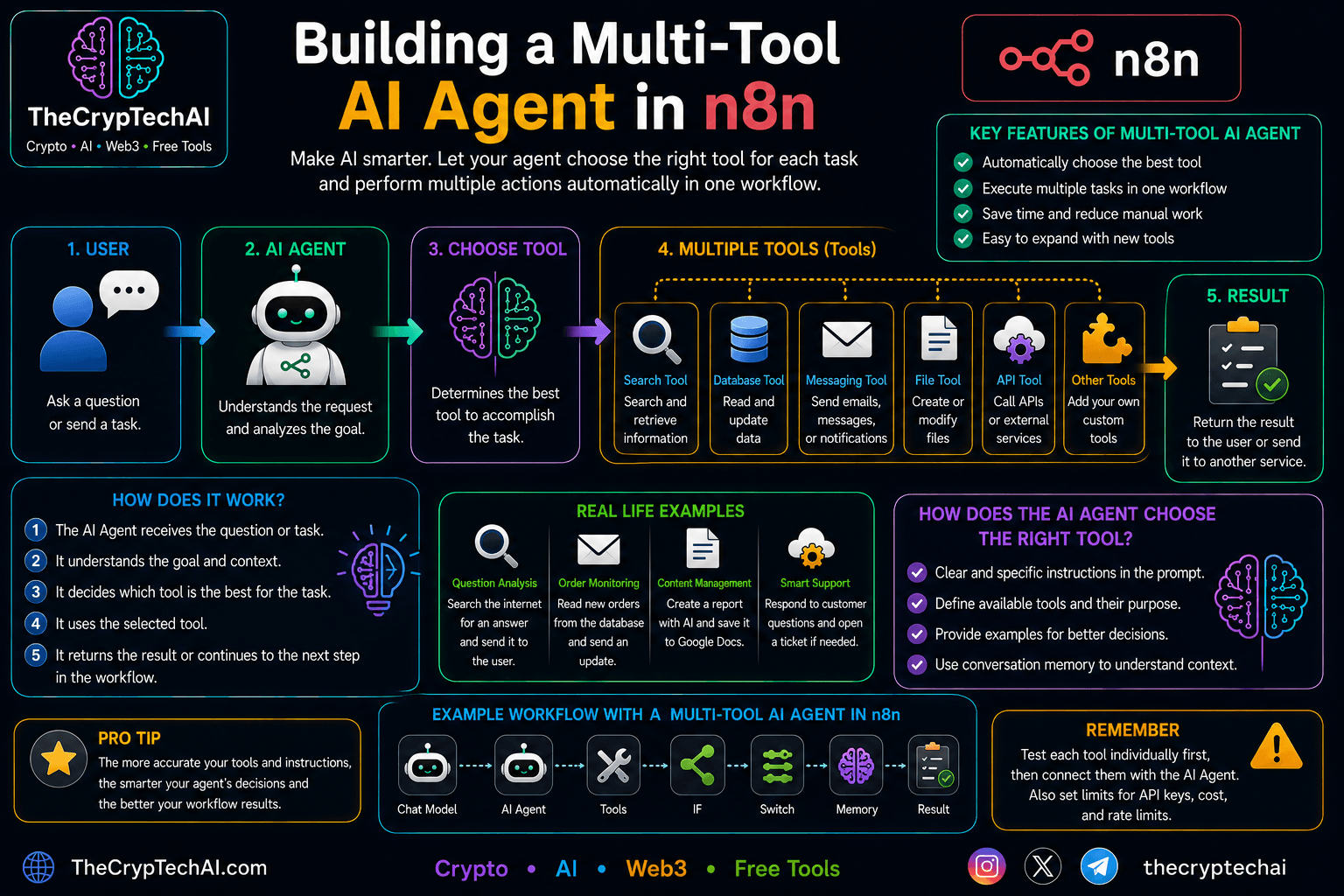
What Is a Multi-Tool AI Agent?
Instead of giving an agent only one tool, you can connect it to several
tools such as search, databases, messaging, files, and APIs.
The AI Agent understands the user's request and decides which tool
is needed to complete the task.
How Does It Work?
- User: Sends a question or task.
- AI Agent: Understands the goal and context.
- Tool Selection: The agent chooses the most appropriate tool.
- Task Execution: The selected tool retrieves data or performs the action.
- Result: The result is returned to the user or passed to another workflow step.
A Multi-Tool Example
Imagine a customer support AI Agent with several available tools.
If a user asks about an order status, the agent can use a database tool.
If the user requests a copy of an invoice, it can use an email tool.
If information is required from an external service, the agent can call
an API tool. This allows one AI Agent to perform different types of tasks
inside the same workflow.
Examples of Available Tools
- Search Tool: Search and retrieve information.
- Database Tool: Read or update stored data.
- Messaging Tool: Send messages and notifications.
- File Tool: Create or work with files.
- API Tool: Connect to external services.
How Does the AI Agent Choose the Right Tool?
Tool selection depends on each tool's description, the instructions
provided in the prompt, and the current task context. Clear names and
descriptions help the agent understand when each tool should be used.
Important Tip
When building a Multi-Tool AI Agent in n8n, test each
tool individually before connecting it to the agent. Protect API keys
and configure appropriate permissions and limits for every external service.
Learn more from the
official n8n AI documentation
.
You can also use the
TheCrypTechAI AI Prompt Generator
to create clearer instructions that help the agent choose the right tool
for each task.
اختبر فهمك
Check Your Understanding
سؤالان سريعان لتثبيت أهم ما تعلمته.
Two quick questions to reinforce the key ideas.