
بناء سير عمل ذكي باستخدام n8n والذكاء الاصطناعي | Building an AI-Powered Workflow with n8n
تعلّم ببساطة، خطوة بخطوة
Learn simply, step by step
معلومة واضحة، ثم خطوة جديدة.
Clear knowledge, one step at a time.
بناء سير عمل ذكي باستخدام n8n والذكاء الاصطناعي Building an AI-Powered Workflow with n8n
يساعدك بناء سير عمل ذكي باستخدام n8n على الجمع بين الأتمتة
والذكاء الاصطناعي، بحيث يستطيع النظام فهم البيانات وتحليلها واتخاذ قرار
قبل تنفيذ الإجراء المناسب تلقائيًا.
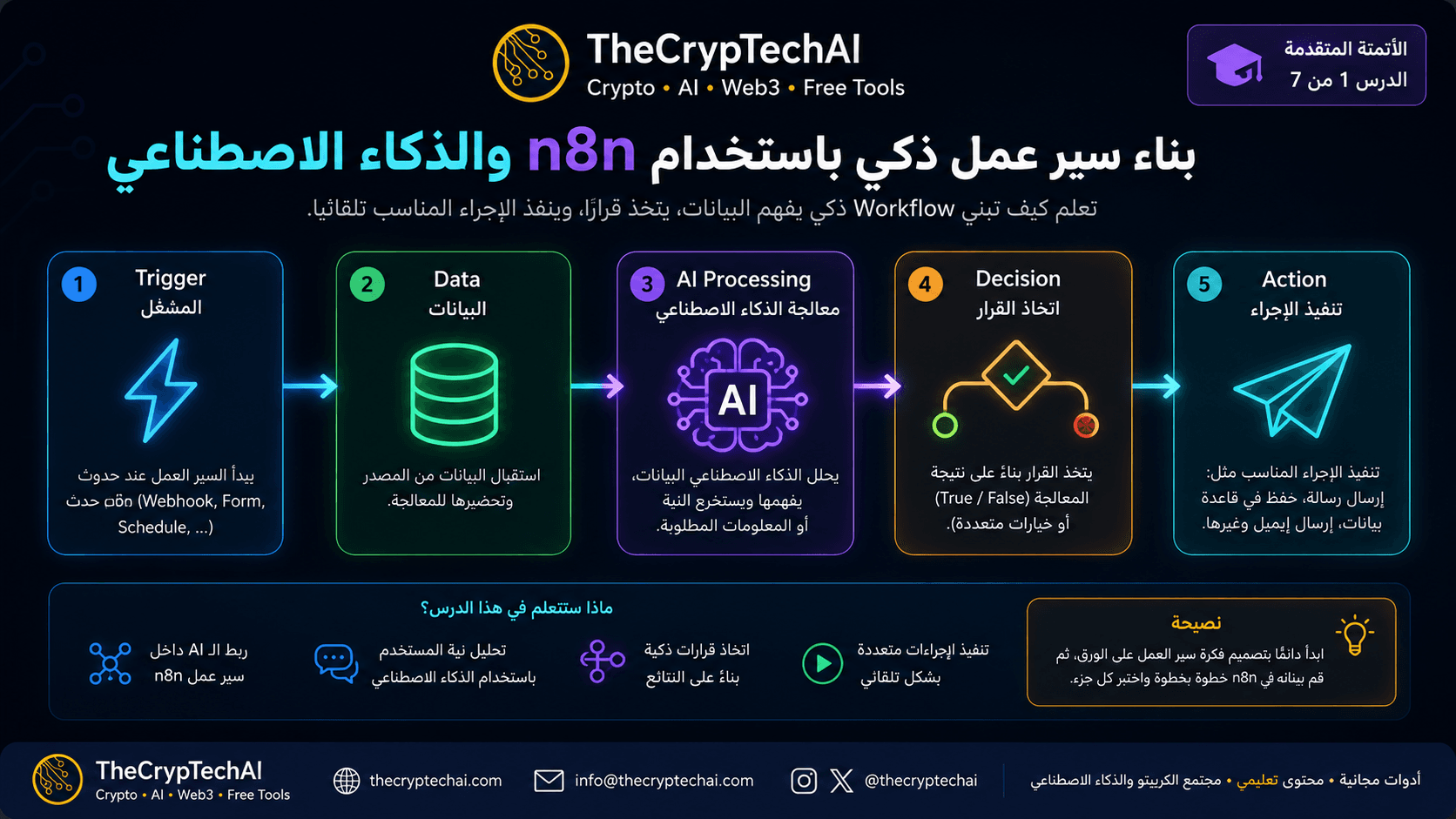
كيف يعمل سير عمل ذكي باستخدام n8n؟
تبدأ الفكرة بحدث يشغّل الـ Workflow، ثم يستقبل n8n البيانات ويرسلها إلى
نموذج ذكاء اصطناعي لتحليلها. بعد ذلك تُستخدم النتيجة لتحديد المسار
أو الإجراء الذي يجب تنفيذه.
-
Trigger:
يبدأ سير العمل عند حدوث شيء معين، مثل Webhook أو إرسال نموذج أو موعد مجدول. -
Data:
يستقبل n8n البيانات ويجهزها للمعالجة. -
AI Processing:
يحلل الذكاء الاصطناعي النص أو البيانات ويستخرج المعلومات المطلوبة. -
Decision:
يتم استخدام نتيجة التحليل لاختيار المسار المناسب. -
Action:
ينفذ النظام الإجراء، مثل إرسال رسالة أو بريد إلكتروني أو حفظ البيانات.
مثال عملي على الأتمتة الذكية
تخيل نموذج تواصل يستقبل رسائل العملاء. يمكن للذكاء الاصطناعي تحليل كل رسالة
وتصنيفها إلى سؤال أو شكوى أو طلب دعم، ثم يقوم n8n بتوجيهها
تلقائيًا إلى المسار المناسب.
بهذه الطريقة يصبح سير عمل ذكي باستخدام n8n مختلفًا عن
الأتمتة التقليدية؛ لأنه لا ينفذ نفس الخطوات دائمًا، بل يستطيع تغيير الإجراء
بناءً على نتيجة تحليل الذكاء الاصطناعي.
كيف تبدأ؟
قبل بناء الـ Workflow، حدد البيانات التي ستدخل إلى النظام، وما الذي سيحلله
الذكاء الاصطناعي، والقرارات الممكنة، والإجراء المطلوب لكل نتيجة. ثم ابنِ
المراحل واحدة تلو الأخرى واختبر كل مرحلة قبل الانتقال إلى التالية.
لمعرفة المزيد عن دمج الذكاء الاصطناعي مع n8n، راجع
وثائق n8n الرسمية للذكاء الاصطناعي
.
ويمكنك أيضًا استكشاف
أدوات TheCrypTechAI المجانية
للاستفادة من أدوات إضافية في الذكاء الاصطناعي والكريبتو والإنتاجية.
n8n can automate many tasks, but when combined with artificial intelligence,
a workflow can understand data, analyze it, and make decisions
before performing the appropriate action.
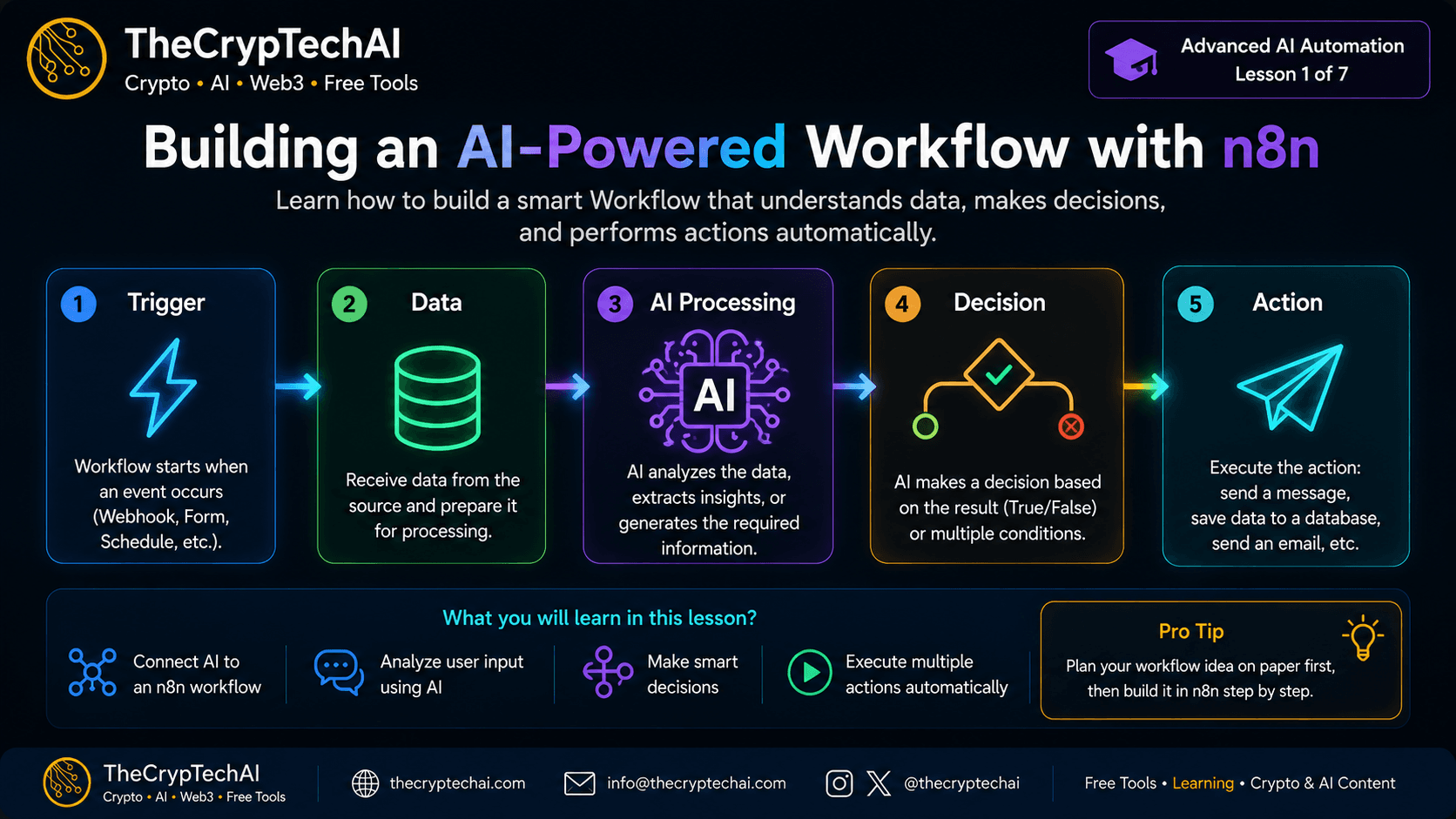
How Does an AI-Powered Workflow Work?
The idea is simple: the workflow starts with an event, receives data,
sends it to an AI model for processing, and then uses the result
to decide which action should be performed.
- Trigger: Starts the workflow, such as a webhook, form, or schedule.
- Data: Receives and prepares the information for processing.
- AI Processing: AI analyzes the text or data and produces the required result.
- Decision: n8n uses the AI result to choose the appropriate path.
- Action: The workflow performs an action such as sending a message, email, or saving data.
A Simple Practical Example
Imagine a contact form that receives customer messages. AI can analyze each message
and classify it as a question, complaint, or support request.
n8n can then automatically route the message to the correct workflow.
This is what makes the workflow intelligent: instead of following only fixed steps,
it can use the AI result to determine what happens next.
Start With a Clear Workflow
Before adding many nodes, define the incoming data, what the AI should analyze,
the possible decisions, and the action required for each result.
This makes your workflow easier to build, test, and improve.
Learn more from the
official n8n Advanced AI documentation
.
You can also explore
TheCrypTechAI free online tools
for more useful tools and resources.
اختبر فهمك
Check Your Understanding
سؤالان سريعان لتثبيت أهم ما تعلمته.
Two quick questions to reinforce the key ideas.