
بناء خطة استجابة للحوادث الرقمية | Building a Digital Incident Response Plan
تعلّم ببساطة، خطوة بخطوة
Learn simply, step by step
معلومة واضحة، ثم خطوة جديدة.
Clear knowledge, one step at a time.
بناء خطة استجابة للحوادث الرقمية Building a Digital Incident Response Plan
التعامل مع الاختراق بعد حدوثه يصبح أسهل عندما تكون لديك خطوات واضحة ومحددة مسبقًا. تساعدك خطة استجابة للحوادث الرقمية على معرفة ما يجب فعله عند اكتشاف نشاط مشبوه، وتقليل الضرر، واستعادة الحسابات والأجهزة بطريقة منظمة بدل اتخاذ قرارات عشوائية أثناء الحادث.
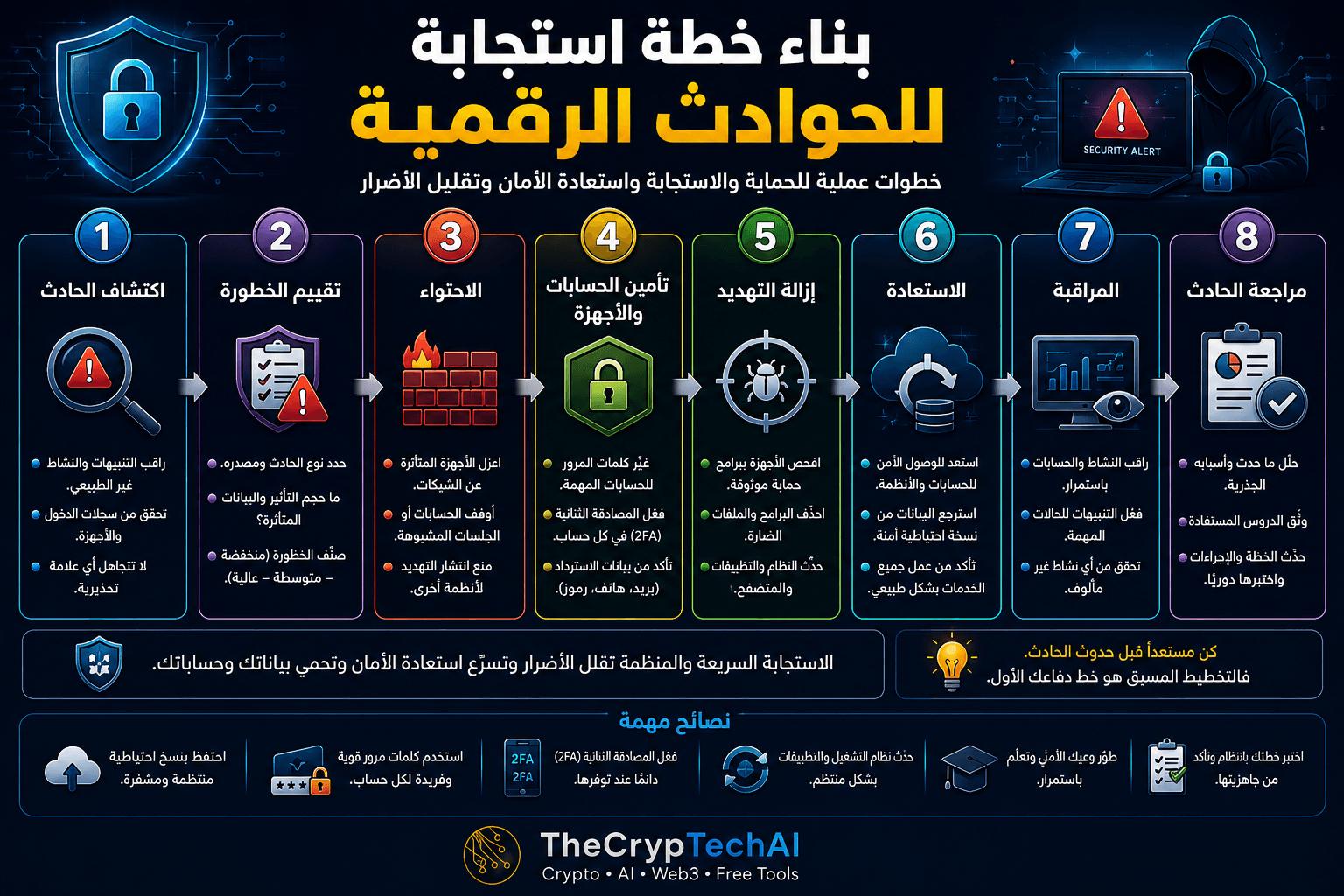
كيف تبني خطة استجابة للحوادث الرقمية؟
لا تحتاج الخطة الشخصية إلى أن تكون معقدة. الهدف هو تحديد مجموعة من الخطوات التي يمكنك اتباعها عند تعرض حساب أو جهاز أو بيانات مهمة لحادث أمني.
ابدأ بتحديد الحسابات والأجهزة الأكثر أهمية بالنسبة لك، وطرق استعادتها، ومكان حفظ النسخ الاحتياطية ورموز الاسترداد، ثم حدد ترتيب الإجراءات التي ستتخذها عند حدوث مشكلة.
1. اكتشف الحادث الأمني
المرحلة الأولى هي اكتشاف وجود مشكلة. راقب تنبيهات تسجيل الدخول، والأجهزة المتصلة، والمعاملات غير المعروفة، والتغييرات غير المتوقعة في إعدادات الحساب، وأي سلوك غير طبيعي في أجهزتك.
كلما اكتشفت الحادث مبكرًا، زادت فرصتك في تقليل الضرر ومنع وصول المهاجم إلى حسابات أو أجهزة إضافية.
2. قيّم مستوى الخطورة
بعد اكتشاف الحادث، حاول تحديد نوعه ومدى تأثيره. هل المشكلة في حساب واحد؟ هل الجهاز نفسه مصاب؟ هل تم كشف كلمة مرور أو بريد إلكتروني أو معلومات مالية؟
صنّف الحادث حسب خطورته، وابدأ بالحسابات أو البيانات الأكثر حساسية مثل البريد الإلكتروني والحسابات المالية ومنصات التداول والمحافظ الرقمية.
3. احتوِ التهديد
الاحتواء يعني منع المشكلة من الانتشار. إذا كان جهازك مشتبهًا بإصابته، افصله مؤقتًا عن الشبكة. وإذا كان هناك حساب مخترق، حاول إنهاء الجلسات غير المعروفة وتأمين الوصول إليه من جهاز موثوق.
هذه المرحلة لا تعني أن المشكلة انتهت، لكنها تساعدك على تقليل قدرة المهاجم على التسبب في أضرار إضافية.
4. أمّن الحسابات والأجهزة
غيّر كلمات المرور المهمة، وابدأ بالبريد الإلكتروني والحسابات الأساسية. استخدم كلمات مرور قوية وفريدة، وراجع بيانات الاسترداد والأجهزة والجلسات والتطبيقات المرتبطة.
فعّل المصادقة الثنائية 2FA متى كانت متاحة، واحتفظ برموز الاسترداد في مكان آمن بعيدًا عن الجهاز الذي تستخدمه يوميًا.
5. أزل مصدر التهديد
إذا كان الحادث مرتبطًا بجهاز، افحصه باستخدام أداة حماية موثوقة واحذف التطبيقات والملفات والإضافات المشبوهة. حدّث نظام التشغيل والمتصفح والبرامج لإغلاق الثغرات المعروفة قدر الإمكان.
أما إذا كان الحادث متعلقًا بحساب، فراجع التطبيقات الخارجية والصلاحيات الممنوحة واحذف أي اتصال لا تعرفه أو لم تعد تحتاج إليه.
6. استعد الحسابات والبيانات بأمان
بعد احتواء التهديد وإزالته، ابدأ استعادة الخدمات تدريجيًا. استخدم النسخ الاحتياطية الموثوقة عند الحاجة، وتأكد من أن الحسابات والأجهزة أصبحت آمنة قبل إعادة استخدامها بشكل طبيعي.
وجود نسخ احتياطية منتظمة للبيانات المهمة يجعل خطة استجابة للحوادث الرقمية أكثر فاعلية ويساعد على تقليل خسارة الملفات عند حدوث مشكلة كبيرة.
7. راقب النشاط بعد الحادث
لا تنهِ عملية الاستجابة بمجرد استعادة الحساب أو الجهاز. راقب تسجيلات الدخول والتنبيهات والمعاملات والنشاط غير المعتاد خلال الفترة التالية.
فعّل إشعارات الأمان للعمليات المهمة، وتحقق من عدم ظهور أجهزة أو جلسات جديدة لا تعرفها.
8. راجع الحادث وتعلم منه
بعد استعادة الأمان، حاول تحديد سبب الحادث. هل بدأت المشكلة من رابط تصيد؟ كلمة مرور معاد استخدامها؟ تطبيق مشبوه؟ أم إعداد أمني ضعيف؟
وثّق ما حدث والخطوات التي نجحت، ثم حدّث خطتك حتى تكون استجابتك أسرع وأكثر فاعلية إذا حدث موقف مشابه مستقبلًا.
جهّز خطة الاستجابة قبل حدوث الاختراق
أفضل وقت لإنشاء خطة استجابة للحوادث الرقمية هو قبل الحاجة إليها. احتفظ بقائمة بالحسابات المهمة، وطرق التواصل الرسمية مع الخدمات التي تستخدمها، والنسخ الاحتياطية، ورموز الاسترداد، وخطوات الطوارئ الأساسية.
يمكنك أيضًا زيارة
مركز الأمان في TheCrypTechAI
للوصول إلى أدوات وإرشادات تساعدك على حماية حساباتك وأجهزتك.
افحص الروابط قبل التعامل معها
إذا بدأ الحادث برسالة أو رابط غير معروف، تجنب فتح الرابط مرة أخرى أثناء التحقيق. يمكنك إجراء فحص أولي باستخدام
فاحص الروابط المشبوهة من TheCrypTechAI
للتعرف على بعض علامات الخطورة قبل زيارة الرابط.
مصدر موثوق للاستجابة للحوادث
للمزيد من المعلومات الرسمية حول الأمن السيبراني والاستجابة للتهديدات، يمكنك مراجعة
إرشادات التهديدات والأمن السيبراني من CISA
.
قاعدة الدرس
اكتشاف الحادث ← تقييم الخطورة ← الاحتواء ← تأمين الحسابات والأجهزة ← إزالة التهديد ← الاستعادة ← المراقبة ← مراجعة الحادث.
وجود خطة استجابة للحوادث الرقمية لا يمنع جميع الهجمات، لكنه يساعدك على الاستجابة بسرعة وبترتيب واضح، وتقليل الأضرار، واستعادة السيطرة، ثم تحسين إجراءات الحماية لمنع تكرار المشكلة.
Security incidents are easier to handle when you already know what steps to take. A Digital Incident Response Plan gives you a clear process for detecting suspicious activity, limiting damage, recovering accounts and devices, and improving your security after the incident.
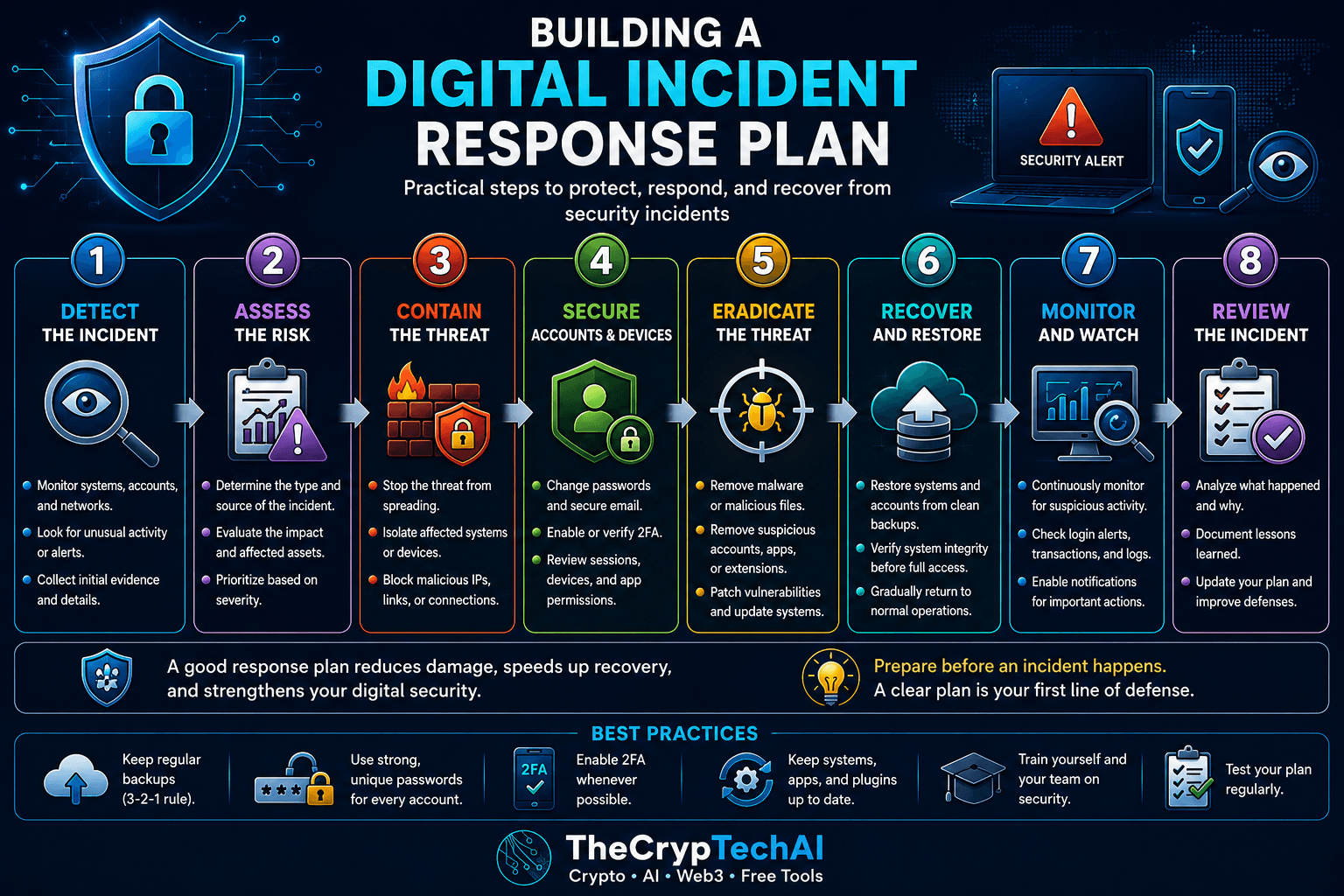
How to Build a Digital Incident Response Plan
A personal response plan does not need to be complicated. Its purpose is to give you a clear sequence of actions when an important account, device, or piece of data is affected by a security incident.
Start by identifying your most important accounts and devices, how they can be recovered, where your backups and recovery codes are stored, and which actions should be prioritized during an emergency.
1. Detect the Incident
The first step is recognizing that something may be wrong. Monitor login alerts, connected devices, unfamiliar transactions, unexpected account changes, and unusual behavior on your devices.
The earlier you detect suspicious activity, the better your chances of limiting the damage and preventing the attacker from reaching additional accounts or systems.
2. Assess the Risk
Determine what type of incident occurred and how serious it may be. Is only one account affected? Is the device itself compromised? Were passwords, email accounts, financial information, or other sensitive data exposed?
Prioritize your most sensitive services, including email accounts, financial services, crypto exchanges, and digital wallets.
3. Contain the Threat
Containment means preventing the incident from spreading. If a device may be infected, temporarily disconnect it from the network. If an account has been compromised, end unfamiliar sessions and secure the account from a trusted device.
Containment does not necessarily remove the threat, but it can reduce the attacker's ability to cause additional damage.
4. Secure Accounts and Devices
Change important passwords, starting with your email and other critical accounts. Use strong, unique passwords and review recovery information, active sessions, connected devices, and third-party applications.
Enable two-factor authentication (2FA) whenever available and keep recovery codes in a secure location.
5. Eradicate the Threat
If the incident involves a device, scan it with trusted security software and remove suspicious applications, files, or browser extensions. Update the operating system, browser, and applications to address known security vulnerabilities.
For account-related incidents, review connected applications and permissions and remove anything you do not recognize or no longer need.
6. Recover Accounts and Data Safely
After containing and removing the threat, gradually restore normal access. Use trusted backups when necessary and verify that your accounts and devices are secure before returning to normal use.
Maintaining regular backups of important information makes your Digital Incident Response Plan more effective and can reduce data loss during a serious incident.
7. Monitor Activity After the Incident
Recovery should not end when access is restored. Continue monitoring login activity, security alerts, transactions, and other unusual behavior.
Enable notifications for important actions and watch for unfamiliar devices or sessions that may indicate continued unauthorized access.
8. Review the Incident and Learn From It
Once security has been restored, determine what caused the incident. Was it a phishing link, a reused password, a suspicious application, or a weak security setting?
Document what happened and which recovery steps worked. Then update your plan so you can respond more effectively if a similar incident occurs again.
Prepare Your Digital Incident Response Plan Before an Attack
The best time to create a Digital Incident Response Plan is before you need one. Keep a record of important accounts, official recovery channels, backups, recovery codes, and the basic security steps you would follow during an emergency.
You can also visit the
TheCrypTechAI Security Center
for additional security guidance and protection tools.
Check Suspicious Links Carefully
If an incident started with an unfamiliar message or link, avoid opening the link again while investigating. You can perform an initial check using the
TheCrypTechAI Suspicious Link Checker
before interacting with an unfamiliar URL.
Trusted Incident Response Guidance
For additional official information about cybersecurity threats and incident response, review
CISA Cyber Threats and Advisories
.
Key Lesson
Detect → Assess → Contain → Secure → Eradicate → Recover → Monitor → Review.
A well-prepared Digital Incident Response Plan cannot prevent every security incident, but it can help you respond faster, reduce damage, regain control, and improve your defenses to reduce the risk of the same problem happening again.
اختبر فهمك
Check Your Understanding
سؤالان سريعان لتثبيت أهم ما تعلمته.
Two quick questions to reinforce the key ideas.