
ماذا تفعل بعد اختراق حساب أو جهاز؟ | What to Do After an Account or Device Breach
تعلّم ببساطة، خطوة بخطوة
Learn simply, step by step
معلومة واضحة، ثم خطوة جديدة.
Clear knowledge, one step at a time.
ماذا تفعل بعد اختراق حساب أو جهاز؟ What to Do After an Account or Device Breach
عند اكتشاف نشاط غريب في أحد حساباتك أو الاشتباه في اختراق جهازك، فإن سرعة التصرف مهمة، لكن يجب أن تكون الخطوات مرتبة ومدروسة. معرفة ماذا تفعل بعد اختراق الحساب تساعدك على استعادة السيطرة وتقليل احتمال وصول المهاجم إلى حسابات أو بيانات إضافية.
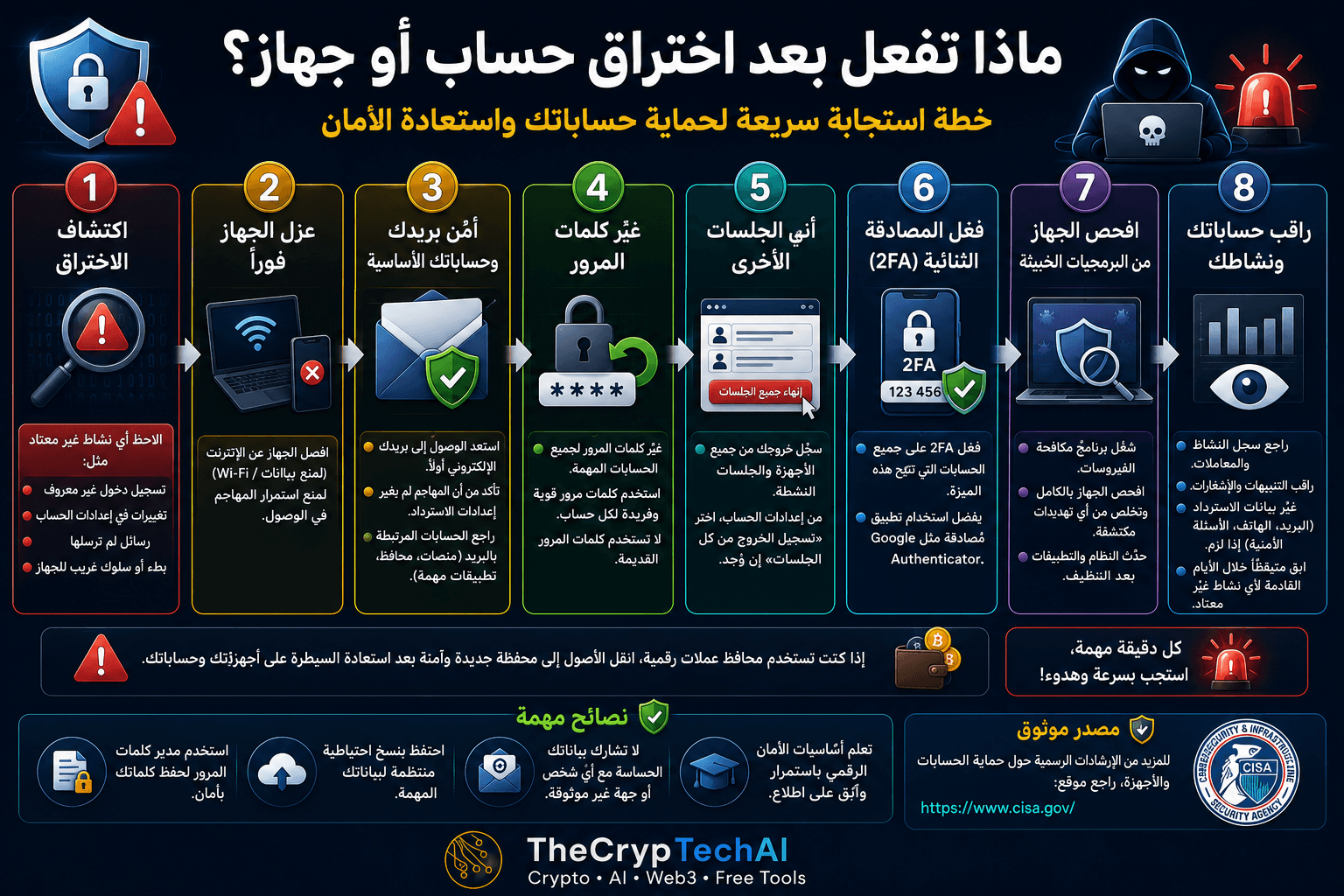
ماذا تفعل بعد اختراق الحساب أو الجهاز؟
ابدأ بتحديد ما حدث. من علامات الاختراق المحتملة تسجيل دخول من جهاز أو موقع غير معروف، أو تغيير كلمة المرور دون علمك، أو رسائل لم ترسلها، أو معاملات غير معروفة، أو ظهور تطبيقات وسلوك غير طبيعي على الجهاز.
لا تتجاهل هذه العلامات حتى لو بدا النشاط بسيطًا، لأن اكتشاف المشكلة مبكرًا قد يمنع المهاجم من الوصول إلى خدمات أخرى مرتبطة بالحساب.
1. اعزل الجهاز المتضرر عند الاشتباه باختراقه
إذا كنت تعتقد أن الجهاز نفسه مصاب ببرمجية ضارة، افصله عن الإنترنت والشبكات الأخرى مؤقتًا لتقليل إمكانية استمرار الاتصال بالمهاجم أو انتشار التهديد.
ويُفضّل استخدام جهاز آخر موثوق عند الدخول إلى الحسابات المهمة وتغيير بيانات الأمان.
2. أمّن بريدك الإلكتروني والحسابات الأساسية
البريد الإلكتروني من أهم الحسابات التي يجب تأمينها لأنه يُستخدم غالبًا لاستعادة كلمات مرور الخدمات الأخرى.
راجع كلمة مرور البريد، وبيانات الاسترداد، ورقم الهاتف، والبريد الاحتياطي، والأجهزة والجلسات المتصلة بالحساب، وتأكد من عدم إضافة معلومات لا تعرفها.
3. غيّر كلمات المرور من جهاز موثوق
غيّر كلمة مرور الحساب المتضرر والحسابات المهمة التي استخدمت فيها نفس كلمة المرور. استخدم كلمة مرور قوية وفريدة لكل حساب ولا تعد إلى كلمة المرور القديمة.
إذا كنت تستخدم عددًا كبيرًا من الحسابات، يمكن لمدير كلمات مرور موثوق مساعدتك في إنشاء كلمات مرور مختلفة وحفظها بأمان.
عند تحديد ماذا تفعل بعد اختراق الحساب، يجب أن يكون تغيير كلمات المرور وتأمين البريد الإلكتروني من أولوياتك، خاصة إذا كانت نفس بيانات الدخول مستخدمة في أكثر من خدمة.
4. أنهِ الجلسات والأجهزة غير المعروفة
تغيير كلمة المرور خطوة مهمة، لكن راجع أيضًا قائمة الأجهزة والجلسات النشطة. استخدم خيار تسجيل الخروج من جميع الجلسات إذا كان متاحًا، ثم أعد تسجيل الدخول من أجهزتك الموثوقة فقط.
احذف أي جهاز أو تطبيق متصل لا تعرفه، وراجع صلاحيات التطبيقات الخارجية المرتبطة بالحساب.
5. فعّل المصادقة الثنائية 2FA
بعد استعادة السيطرة على الحساب، فعّل المصادقة الثنائية إذا كانت الخدمة تدعمها. فهي تضيف طبقة حماية إضافية في حالة معرفة شخص آخر لكلمة المرور.
احتفظ أيضًا برموز الاسترداد في مكان آمن ولا تشارك رموز المصادقة أو الاسترداد مع أي شخص.
6. افحص الجهاز وحدّث النظام
إذا كان الاختراق مرتبطًا بالجهاز، شغّل فحصًا باستخدام أداة حماية موثوقة، واحذف البرامج أو الإضافات غير المعروفة، ثم حدّث نظام التشغيل والمتصفح والتطبيقات.
إذا استمر الجهاز في إظهار سلوك غير طبيعي بعد الفحص، فقد تحتاج إلى مساعدة تقنية متخصصة قبل استخدامه مرة أخرى للوصول إلى حسابات حساسة.
7. راقب حساباتك بعد الاختراق
استمر في مراجعة تنبيهات تسجيل الدخول والجلسات والنشاط المالي والرسائل خلال الفترة التالية للحادث. فعّل إشعارات العمليات المهمة متى كانت متاحة.
إذا وجدت عملية مالية لا تعرفها، تواصل سريعًا مع البنك أو المنصة أو مزود الخدمة من خلال القنوات الرسمية.
ماذا عن محافظ ومنصات العملات الرقمية؟
إذا كان الحادث يتعلق بمحفظة أو حساب كريبتو، لا تشارك العبارة السرية أو المفتاح الخاص مع أي شخص يدّعي أنه يستطيع استعادة أموالك.
إذا كنت تشك في أن بيانات محفظة غير احتجازية قد انكشفت، فقد يكون من الضروري نقل الأصول المتبقية إلى محفظة جديدة وآمنة تم إنشاؤها على جهاز موثوق، مع التأكد أولًا من أن الجهاز المستخدم آمن.
يمكنك زيارة
مركز الأمان في TheCrypTechAI
للوصول إلى المزيد من إرشادات وأدوات الحماية.
انتبه لمحاولات الاحتيال بعد الاختراق
قد تظهر بعد الحادث رسائل تدّعي تقديم الدعم أو استعادة الحساب أو الأموال. لا تثق في أي شخص يطلب كلمة مرور أو رمز 2FA أو عبارة استرداد، ولا تضغط على روابط غير معروفة.
يمكنك إجراء فحص أولي للروابط غير المألوفة باستخدام
فاحص الروابط المشبوهة من TheCrypTechAI
قبل التعامل معها.
إرشادات رسمية للاستجابة للحوادث الأمنية
للحصول على معلومات إضافية حول التعامل مع الحوادث الرقمية، يمكنك مراجعة
إرشادات التهديدات والأمن السيبراني من CISA
.
قاعدة الدرس
اكتشف الاختراق ← اعزل الجهاز ← أمّن البريد والحسابات ← غيّر كلمات المرور ← أنهِ الجلسات ← فعّل 2FA ← افحص الجهاز ← راقب النشاط.
عندما تعرف ماذا تفعل بعد اختراق الحساب يصبح من الأسهل تقليل الضرر واستعادة السيطرة. الأهم هو تأمين الحسابات الأساسية أولًا، وإغلاق طرق الوصول القديمة، ثم مراقبة أي نشاط جديد قد يشير إلى استمرار التهديد.
If you notice unusual activity in one of your accounts or suspect that a device has been compromised, acting quickly is important. Knowing What to Do After an Account Breach can help you regain control, protect your data, and reduce the risk of attackers reaching other connected accounts.
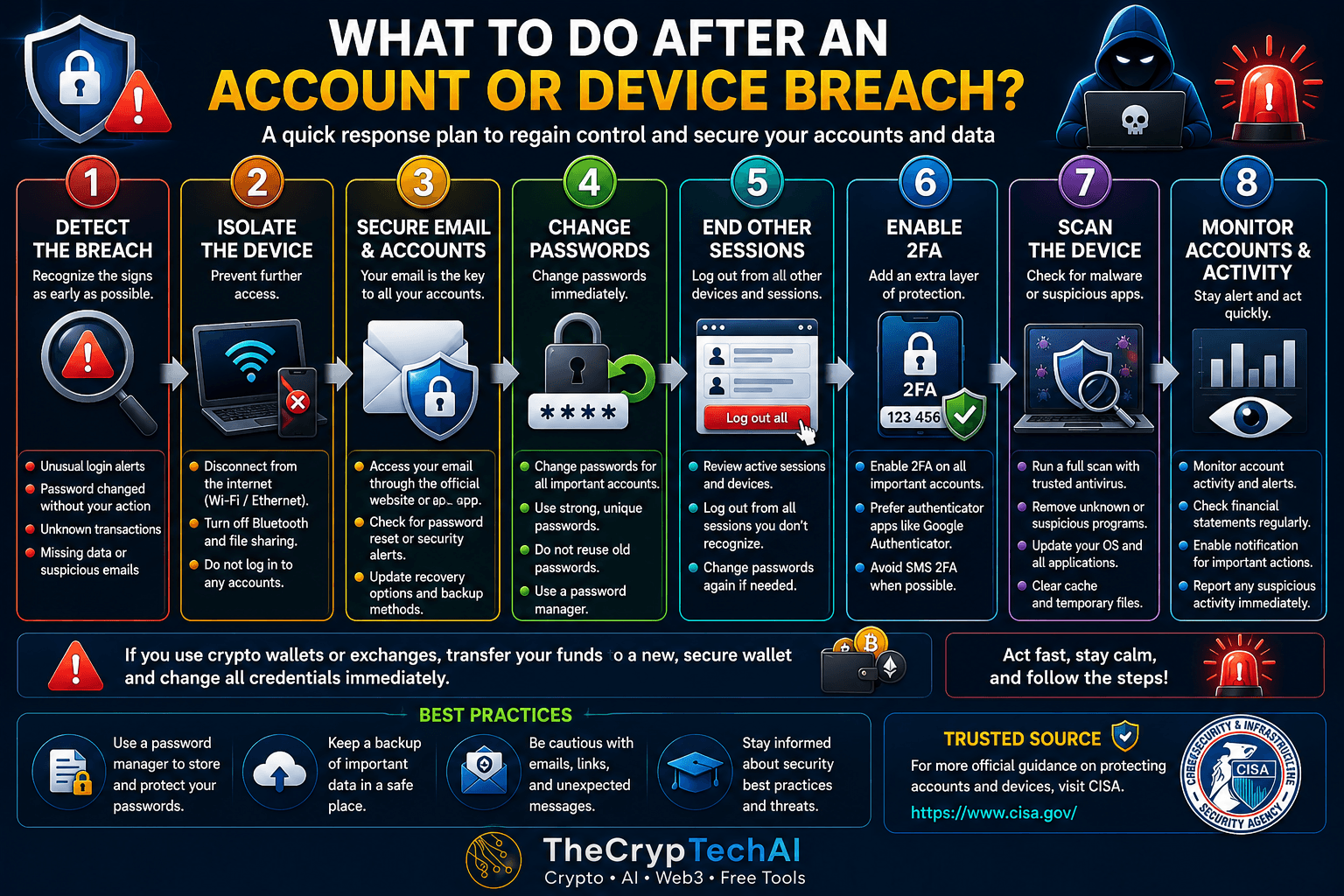
What to Do After an Account Breach or Device Compromise
Start by identifying what happened. Possible warning signs include an unknown login, a password change you did not make, messages you did not send, unfamiliar transactions, or unusual applications and behavior on your device.
Do not ignore these signs. Detecting suspicious activity early can help prevent an attacker from reaching additional services connected to your account.
1. Isolate a Compromised Device
If you suspect that the device itself contains malware, temporarily disconnect it from the internet and other networks. This can help limit further communication with an attacker or the spread of malicious software.
Whenever possible, use another trusted device when accessing important accounts and changing security settings.
2. Secure Your Email and Important Accounts
Your email account should be one of your first priorities because it is often used to reset passwords for other services.
Review your email password, recovery information, phone number, backup email address, connected devices, and active sessions. Remove any information or device you do not recognize.
3. Change Your Passwords
Change the password for the affected account and any important accounts where the same password was reused. Create a strong and unique password for every account and avoid returning to an old password.
A trusted password manager can help you generate and securely store unique passwords for multiple accounts.
4. End Unknown Sessions and Remove Devices
Changing your password is important, but you should also review active sessions and connected devices. If available, use the option to sign out of all sessions and then sign back in only from trusted devices.
Remove unfamiliar devices, applications, and third-party permissions connected to your account.
5. Enable Two-Factor Authentication
After regaining control, enable two-factor authentication (2FA) on important accounts whenever the service supports it. This provides an additional security layer if someone obtains your password.
Keep your recovery codes in a secure location, and never share authentication or recovery codes with anyone.
6. Scan and Update the Device
If the incident may involve your device, run a security scan using trusted protection software. Remove unknown applications or browser extensions and update your operating system, browser, and installed applications.
If suspicious behavior continues after the scan, consider getting professional technical assistance before using the device again for sensitive accounts.
7. Monitor Your Accounts After the Breach
Continue reviewing login alerts, active sessions, financial activity, and messages after the incident. Enable notifications for important account actions whenever they are available.
If you discover an unauthorized financial transaction, contact the bank, exchange, or service provider immediately through its official channels.
What About Crypto Wallets and Exchanges?
If the incident involves a crypto wallet or exchange account, never give your recovery phrase, private key, password, or authentication code to anyone claiming they can recover your funds.
If you believe the credentials of a self-custody wallet have been exposed, you may need to move any remaining assets to a new secure wallet created on a trusted device. Make sure the device you use is secure before creating or accessing the new wallet.
Visit the
TheCrypTechAI Security Center
for additional security guidance and protection tools.
Watch for Scams After a Breach
After a security incident, you may receive messages claiming to provide account or fund recovery services. Do not trust anyone asking for passwords, 2FA codes, recovery phrases, or private keys.
If you receive an unfamiliar link, you can perform an initial check using the
TheCrypTechAI Suspicious Link Checker
before interacting with it.
Trusted Security Guidance
For additional information about cyber threats and security incidents, review
CISA Cyber Threats and Advisories
.
Key Lesson
Detect the Breach → Isolate the Device → Secure Email & Accounts → Change Passwords → End Sessions → Enable 2FA → Scan the Device → Monitor Activity.
Knowing What to Do After an Account Breach can reduce the damage and help you regain control. Secure your most important accounts first, remove unauthorized access, and continue monitoring for signs that the threat is still active.
اختبر فهمك
Check Your Understanding
سؤالان سريعان لتثبيت أهم ما تعلمته.
Two quick questions to reinforce the key ideas.