
ربط أدوات خارجية مع AI Agent في n8n | Connecting External Tools to AI Agents in n8n
تعلّم ببساطة، خطوة بخطوة
Learn simply, step by step
معلومة واضحة، ثم خطوة جديدة.
Clear knowledge, one step at a time.
ربط أدوات خارجية مع AI Agent في n8n Connecting External Tools to AI Agents in n8n
تسمح أدوات AI Agent في n8n لوكيل الذكاء الاصطناعي
بالاتصال بخدمات خارجية وجلب البيانات وتنفيذ إجراءات فعلية، بدل الاكتفاء
بإنشاء إجابة نصية فقط.
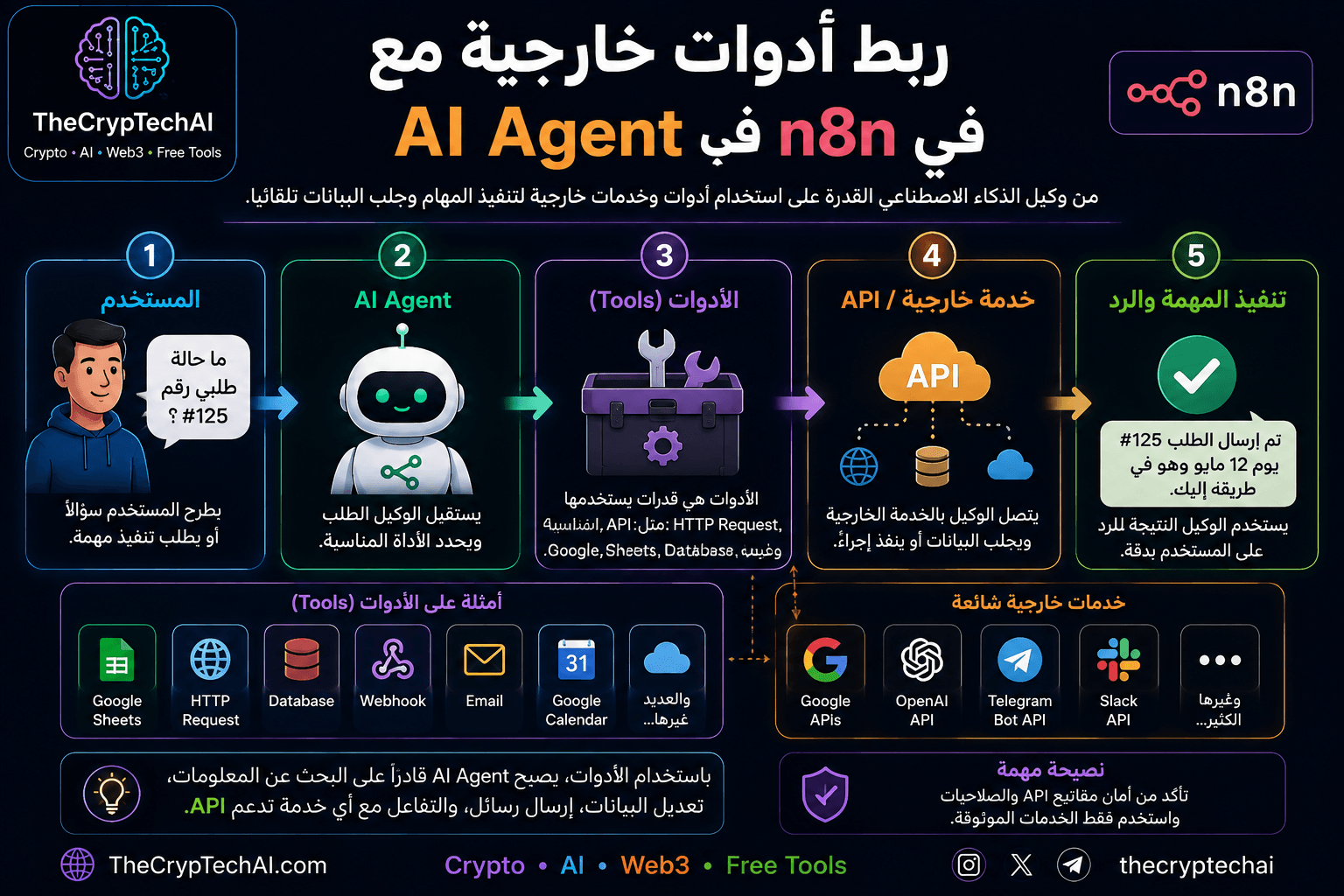
ما هي أدوات AI Agent في n8n؟
الأدوات هي قدرات إضافية يمكن للوكيل استخدامها عند الحاجة.
فعلى سبيل المثال، يمكنه البحث عن معلومة، قراءة بيانات من Google Sheets،
الاتصال بواجهة API، إرسال رسالة أو تحديث قاعدة بيانات.
كيف يستخدم AI Agent الأدوات؟
- المستخدم: يرسل سؤالًا أو يطلب تنفيذ مهمة.
- AI Agent: يفهم الطلب ويحدد الأداة المناسبة.
- Tool: يتم استدعاء الأداة المطلوبة داخل Workflow.
- الخدمة الخارجية: يتم جلب البيانات أو تنفيذ الإجراء.
- النتيجة: يستخدم الوكيل النتيجة لتقديم الرد أو إكمال المهمة.
مثال بسيط
تخيل أن المستخدم يسأل عن حالة طلب رقم #125.
يمكن للوكيل استخدام أداة متصلة بقاعدة بيانات أو API للبحث عن الطلب
واسترجاع حالته الحالية.
بعد استلام البيانات، يستطيع AI Agent الرد على المستخدم بالمعلومات الصحيحة
دون الحاجة إلى إدخال البيانات يدويًا في المحادثة.
أمثلة على الأدوات والخدمات
- HTTP Request: للاتصال بواجهات API.
- Google Sheets: لقراءة البيانات أو تحديثها.
- Databases: للبحث في البيانات وتخزين المعلومات.
- Webhooks: لاستقبال أو إرسال البيانات بين الخدمات.
- Email وTelegram: لإرسال الرسائل والتنبيهات.
لماذا تعتبر الأدوات مهمة؟
تجعل أدوات AI Agent في n8n الوكيل قادرًا على الانتقال
من مجرد فهم الطلب إلى تنفيذ إجراءات حقيقية داخل Workflow، وهو ما يسمح
ببناء أتمتة أكثر ذكاءً وفائدة.
عند ربط خدمات خارجية، احرص دائمًا على حماية مفاتيح API ومنح أقل
الصلاحيات المطلوبة واستخدام الخدمات الموثوقة فقط.
لمعرفة المزيد يمكنك الرجوع إلى
وثائق الذكاء الاصطناعي الرسمية في n8n
.
ويمكنك أيضًا استخدام
أداة إنشاء البرومبت بالذكاء الاصطناعي من TheCrypTechAI
لإنشاء تعليمات واضحة للوكيل عند بناء Workflows تعتمد على الذكاء الاصطناعي.
AI Agent Tools in n8n allow an AI agent to connect
with external services, retrieve data, and perform real actions instead
of only generating text responses.
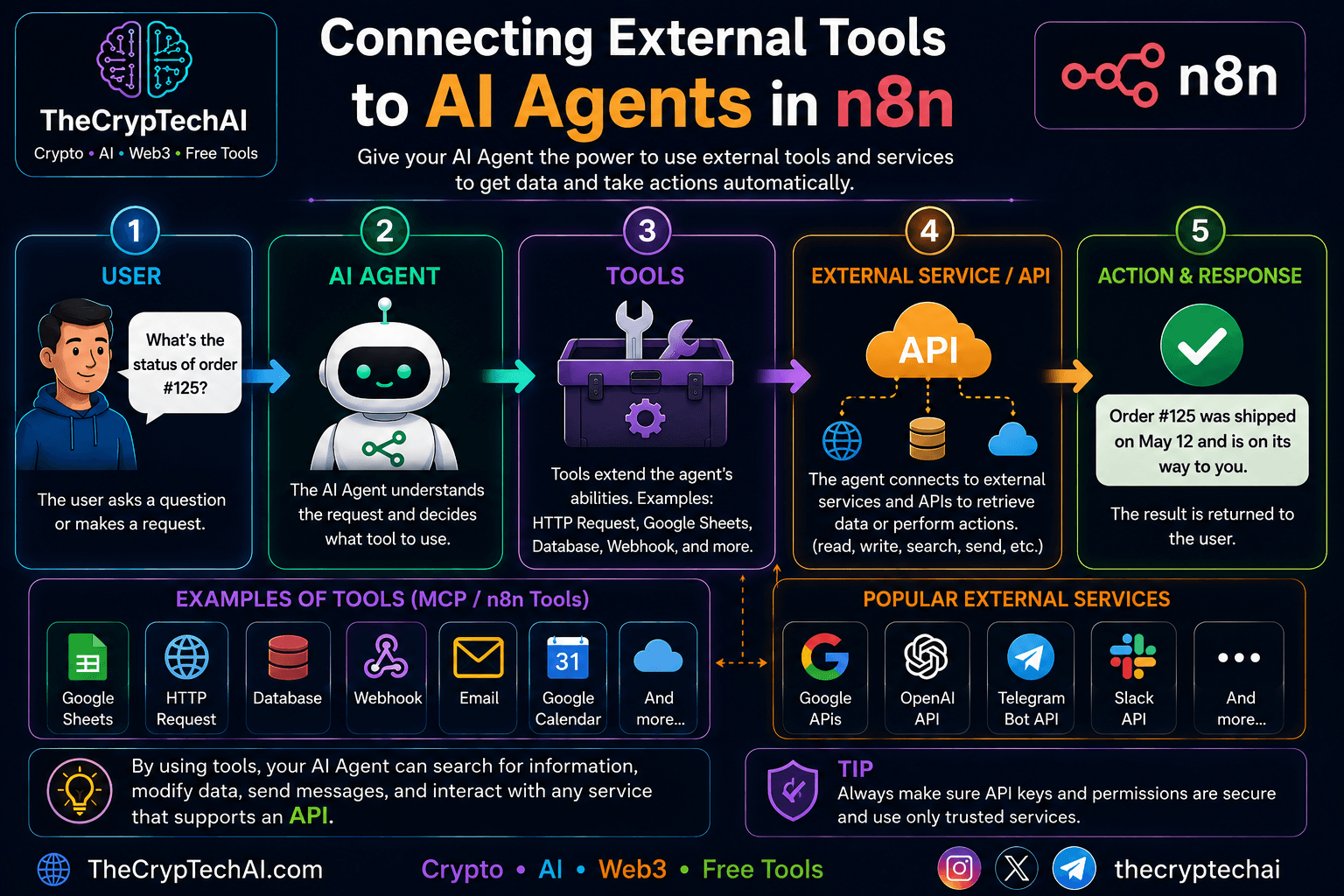
What Are AI Agent Tools in n8n?
Tools give an AI Agent additional capabilities that it can use when needed.
For example, the agent can search for information, read data from Google Sheets,
connect to an API, send a message, or update a database.
How Does an AI Agent Use Tools?
- User: Sends a question or requests a task.
- AI Agent: Understands the request and selects the appropriate tool.
- Tool: The required tool is called inside the workflow.
- External Service: Data is retrieved or an action is performed.
- Result: The agent uses the result to respond or complete the task.
A Simple Example
Imagine a user asking about the status of order #125.
The agent can use a tool connected to a database or API to find the order
and retrieve its current status.
After receiving the data, the AI Agent can provide the correct information
without requiring someone to manually enter it into the conversation.
Examples of Tools and Services
- HTTP Request: Connect to external APIs.
- Google Sheets: Read or update spreadsheet data.
- Databases: Search, retrieve, and store information.
- Webhooks: Send or receive data between services.
- Email and Telegram: Send messages and notifications.
Why Are Tools Important?
AI Agent Tools in n8n allow the agent to move beyond
understanding a request and actually perform useful actions inside a workflow,
making AI automation much more powerful.
When connecting external services, always protect your API keys,
grant only the permissions that are required, and use trusted services.
Learn more from the
official n8n AI documentation
.
You can also use the
TheCrypTechAI AI Prompt Generator
to create clearer instructions for AI-powered workflows.
اختبر فهمك
Check Your Understanding
سؤالان سريعان لتثبيت أهم ما تعلمته.
Two quick questions to reinforce the key ideas.